
The MSP Pricing Playbook: What Sales-Driven IT Companies Don’t Want You to Know
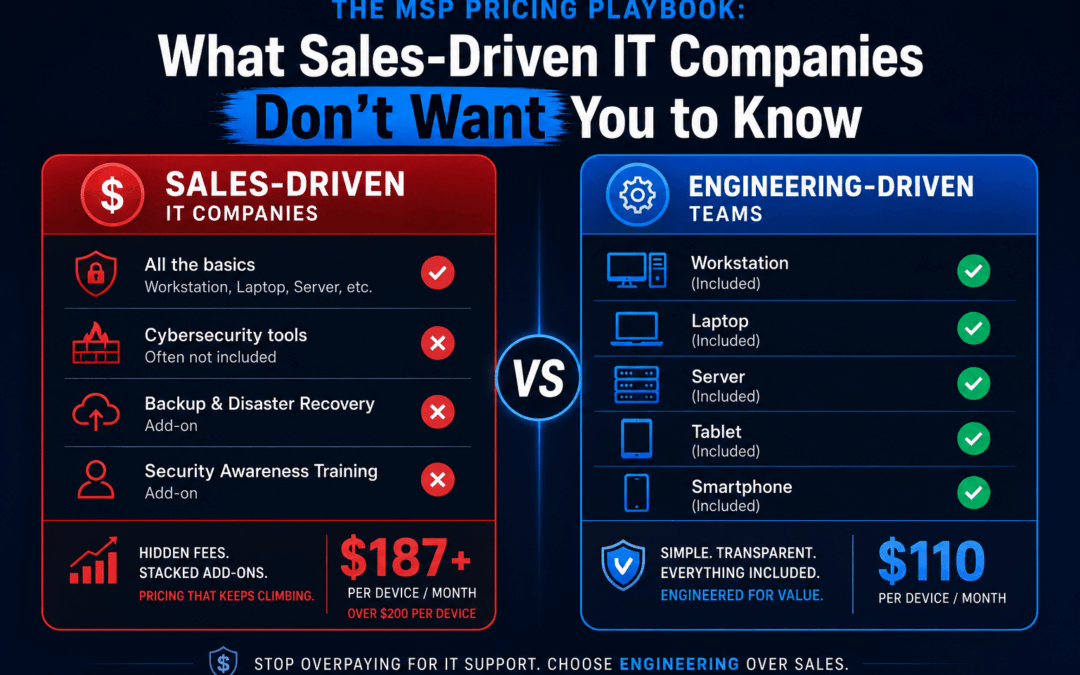
The MSP Pricing Playbook: What Sales-Driven IT Companies Don’t Want You to Know
IT support pricing in 2026 is murkier than ever. Here’s how to cut through the noise, spot the upsell tactics, and understand what managed IT services should actually cost.
May 19, 2026 9 min read
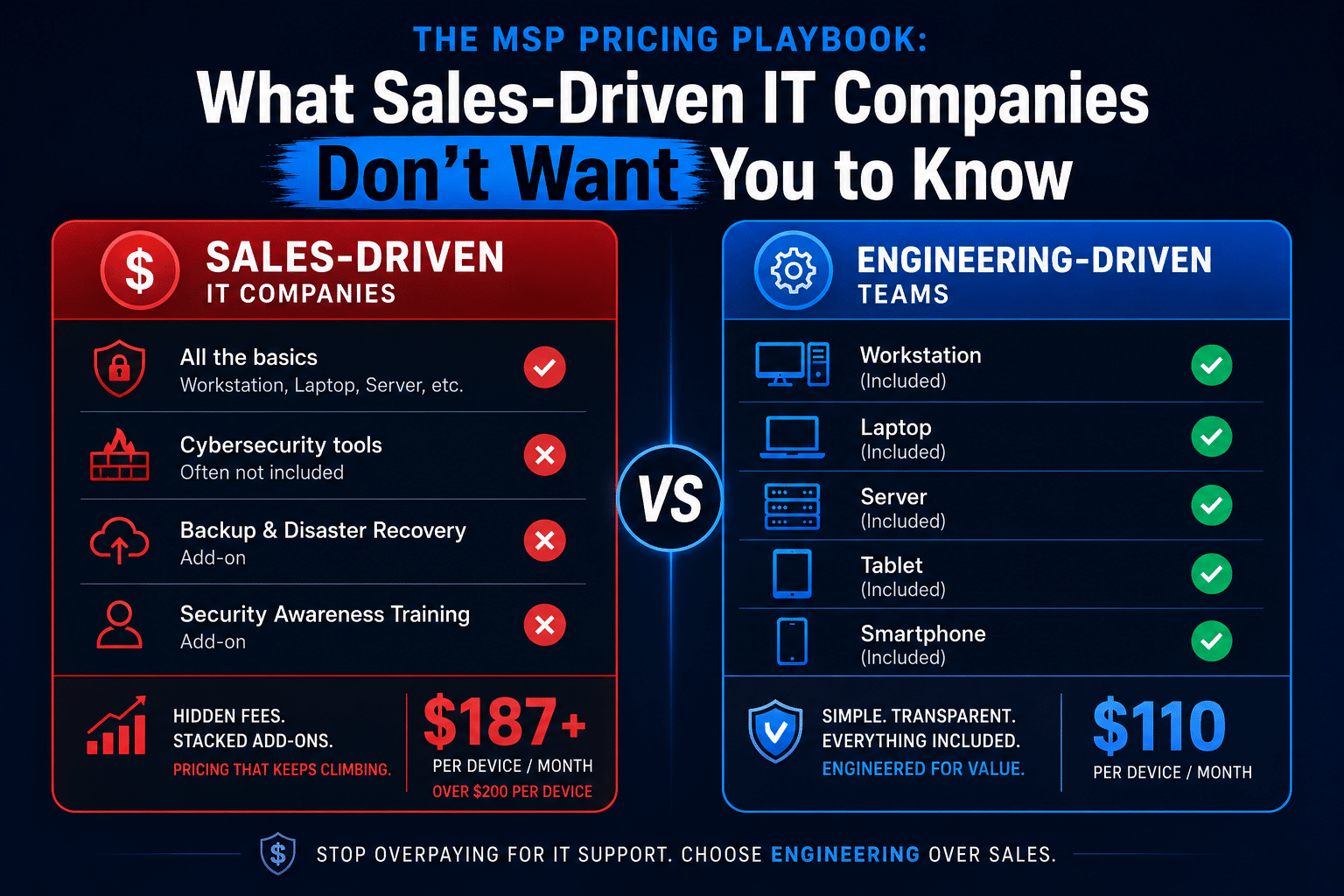
This article is going to be blunt. We’re going to walk through how some of the most prominent managed IT service providers in Orange County price their services, why those models benefit the MSP more than you, and what honest, needs-based IT support pricing looks like in 2026.
$157
per user/month — what some
OC MSPs charge at their “standard” tier
$200+
per user/month when the security
bundle upsell closes
$100 – $110
per device/month — TechHeights’
flat rate, no bundle required
Per-User Pricing Looks Simple. Until You Do the Math.
The per-user pricing model has become the dominant approach in the managed IT services industry — and it’s easy to see why MSPs love it. It’s straightforward to pitch: “just $X per user per month.” Clean, predictable, easy to sell. But “easy to sell” and “honest” are not the same thing.
Some prominent Orange County IT companies openly publish their managed IT services cost structures. A typical example: a “standard” tier priced at approximately $157 per user per month, with a “premium” security bundle pushing that figure to $175–$250 per user. On the surface, this sounds reasonable. But here’s where it gets interesting.
A business with 20 employees paying $157 per user is spending $3,140 per month — or $37,680 per year — before the upsell conversation even starts. For most small and mid-sized businesses in Orange County, that’s a significant line item. And here’s the critical question almost nobody asks: is that price based on what your business actually needs, or what the MSP’s sales team has been trained to close?
The Per-User vs. Per-Device Math — Run It for Your Own Business
Per-User Example (sales-driven MSP): 20 employees × $157/user = $3,140/month — regardless of how many devices those employees actually use or what support they actually generate.
Per-Device Example (TechHeights): 20 devices × $105/device = $2,100/month. You pay for what exists and what we actually support. If you add a device, you add one line. If you remove one, it’s gone. No ambiguity.
The Security Bundle: IT’s Version of the Extended Warranty
Here is where the managed IT services cost conversation gets genuinely frustrating. After landing a client on a standard tier, sales-driven MSPs have a reliable second act: the security bundle upsell. It arrives dressed as urgency. “With the threat landscape in 2026, you really need this.” “Basic antivirus isn’t enough anymore.” “This package covers everything.”
Some of those statements are true in isolation. Basic antivirus alone is not adequate. But that’s not the same thing as saying every item in a security bundle is necessary for your specific business. A five-person accounting firm and a 50-person manufacturing company do not have the same threat profile, the same compliance obligations, or the same budget. Selling both of them the same “premium security bundle” isn’t cybersecurity. It’s inventory clearance.
The Real Cost of the Bundle Upsell
An MSP bumping 20 users from $157 to $200/month — a modest-sounding $43 increase — adds $10,320 to your annual IT bill. Ask yourself: was each tool in that bundle evaluated for your specific environment, or was the bundle the product?
What’s Actually Inside a Typical “Security Bundle”
Let’s look at what premium security bundles typically include — and be honest about the value each line item actually delivers for a typical small business.
-
EDR / MDR — Endpoint Detection & Response
Genuinely necessary. Tools like SentinelOne or CrowdStrike provide real behavioral threat detection beyond what antivirus can do. This one belongs in most environments. The question is which tool and whether the MDR layer (human monitoring) is actually staffed — or just marketed as staffed.
-
Email Security — Attachment Sandboxing, Link Protection
Necessary for most businesses. Email is still the primary attack vector. A well-configured email security layer is worth its cost for nearly any organization with more than a handful of users. That said, if you’re already on Microsoft 365 Business Premium, you may already have Defender for Office 365 — paying twice is not a security strategy.
-
Dark Web Monitoring
Often overhyped. Dark web monitoring alerts you when credentials associated with your domain appear in breach databases. This is largely automated scanning — not active threat hunting. For most SMBs, it’s a nice-to-have, not a business-critical control. It should cost accordingly, not serve as a justification to push you into a premium tier.
-
Security Awareness Training & Phishing Simulations
Valuable when done right; checkbox security when done wrong. Monthly phishing sims sent to employees with no follow-up coaching or curriculum are not training. They’re a metric. Genuine security awareness training requires content, reinforcement, and measurement. Many bundle versions deliver the simulation; the training is an afterthought.
-
Compliance Support & Strategic Planning
Premium-tier language for what should be a standard deliverable. Positioning “strategic planning” as a premium add-on is a red flag. Any MSP worth retaining should understand your compliance landscape from day one. If you’re in healthcare, legal, or financial services, compliance services are not a luxury tier — they’re foundational.
The Five Red Flags of a Sales-Driven MSP
Not every MSP is selling you something you don’t need — but the incentive structures of per-user tiered pricing and bundled security products make it easy for sales-driven firms to prioritize revenue per seat over actual security outcomes. Here’s how to spot the difference before you sign.
-
Red Flag 1: No Risk Assessment Before the Proposal
If an MSP is quoting you a per-user price and a security tier before they’ve assessed your environment, your industry, or your compliance requirements, the proposal is built around their standard margin — not your actual needs. A responsible MSP starts with a discovery process. A sales-driven one starts with the close.
-
Red Flag 2: Security Is a Tier, Not a Conversation
Presenting security as Bronze/Silver/Gold packages is convenient for the MSP. It is not a cybersecurity strategy. Your managed cybersecurity services should reflect your actual threat surface — not a product catalog. If the answer to “what do I need?” is always “the premium bundle,” you’re talking to a salesperson, not an advisor.
-
Red Flag 3: Pricing Is Per-User but Support Is Not Per-Problem
Here’s a question worth asking: does the per-user price include unlimited on-site visits? Vendor coordination? Project work? Some MSPs charging $150+ per user still bill separately for on-site calls, after-hours support, or any work that falls outside a narrowly defined scope. Always get the exclusions list before comparing quotes.
-
Red Flag 4: Long Contract Terms with No Performance Clause
A 2–3 year contract from an MSP who hasn’t yet delivered a single ticket is a confidence indicator — and not a positive one. Month-to-month agreements put the MSP on the hook to actually perform. Long contracts protect the MSP’s revenue regardless of service quality. Ask for 30–60 day termination terms. If they refuse, ask yourself why they need the leverage.
-
Red Flag 5: “Cybersecurity” as a Marketing Word, Not a Technical Commitment
Ask any MSP pitching you a security bundle: who monitors the alerts? What is the SLA for a confirmed endpoint compromise? What happens at 2 AM on a Saturday? Vague answers — or answers that direct you to a 24/7 monitoring claim without specifics — are a problem. Security theater is indistinguishable from real security until something goes wrong.
What “Only What You Need” Actually Looks Like
At TechHeights, the approach to managed IT services cost is built on two principles. First, $100–$110 per device covers comprehensive managed IT — monitoring, help desk, patching, maintenance, and real support. Second, cybersecurity tools are selected based on your specific risk profile, compliance requirements, and budget — not packaged into tiers and sold at a markup.
A professional services firm with 15 employees and no regulated data may need EDR and email security. Full stop. A healthcare practice with the same headcount needs EDR, email security, HIPAA-compliant backup, access controls, and a compliance-ready documentation framework. Those are different environments. They deserve different solutions. Selling them the same “premium bundle” serves only one party.
A Side-by-Side Look: What You Pay and What You Get
| Factor | Sales-Driven MSP (Per-User) | TechHeights (Per-Device) |
|---|---|---|
| Base pricing | $125–$175/user/month | $100–$110/device/month |
| Security tools | Bundled — you buy the package | Selected per your actual needs |
| 20-employee monthly cost | $3,140+ (before upsell) | ~$2,100 |
| Annual difference | Up to $37,680/year | ~$25,200/year |
| Pre-sale risk assessment | Often skipped or superficial | Always conducted first |
| Contract terms | Often 1–3 year lock-in | Flexible terms available |
| Compliance support | Premium tier add-on | Included in service scope |
Questions to Ask Any MSP Before You Sign
- What is your discovery process? Any MSP should be able to describe how they assess a new client’s environment before recommending tools or pricing. If the answer is “we have standard tiers,” that’s your answer.
- What is NOT included in the quoted price? Get the exclusions in writing. On-site visits, vendor calls, after-hours support, and project work are commonly billed separately — even by MSPs charging $150+ per user.
- Who specifically monitors security alerts, and during what hours? “24/7 monitoring” can mean a human SOC or an automated alert that goes to a queue until Monday morning. Know which one you’re buying.
- Can you explain why each security tool in the proposal is necessary for my environment? A confident, specific answer means they’ve done the work. A generic answer about “the threat landscape” means they haven’t.
- What are the contract termination terms? 30–60 days is standard. Anything beyond 90 days requires a strong reason. Require a performance clause that protects you if SLAs are consistently missed.
- What does your pricing look like in year two? Annual price increases happen. Ask if they are capped, and get that cap in writing before you sign.
- Do you have experience in my industry? Healthcare, legal, financial services, and professional services firms all carry varying regulatory and data-handling requirements that generic IT support doesn’t address. Verify that your MSP understands your specific business environment before signing anything.
The Bottom Line on IT Support Pricing in 2026
Sales-driven MSPs have built their businesses around the opposite model. Opaque tier names, bundled security products with padded margins, long contracts that reward retention over performance, and per-user pricing that scales their revenue without scaling the value delivered to you. It’s a profitable business model. It is not a client-first one.
If you’re an Orange County business re-evaluating your IT support costs or a Riverside company exploring managed IT services in the Inland Empire, the benchmark is simple: your MSP should be able to justify every line item in your bill. If they can’t — or won’t — that’s your answer.
Tired of Paying for IT You Don’t Need?
TechHeights delivers transparent, per-device managed IT services and targeted cybersecurity trusted by 250+ businesses across Orange County and Riverside since 2007. We’ll assess your environment and tell you exactly what you need — and what you don’t.
Recent Comments