The MSP Pricing Playbook: What Sales-Driven IT Companies Don’t Want You to Know

The MSP Pricing Playbook: What Sales-Driven IT Companies Don’t Want You to Know

MSP Pricing Exposed

The MSP Pricing Playbook: What Sales-Driven IT Companies Don’t Want You to Know

IT support pricing in 2026 is murkier than ever. Here’s how to cut through the noise, spot the upsell tactics, and understand what managed IT services should actually cost.

May 19, 2026           9 min read

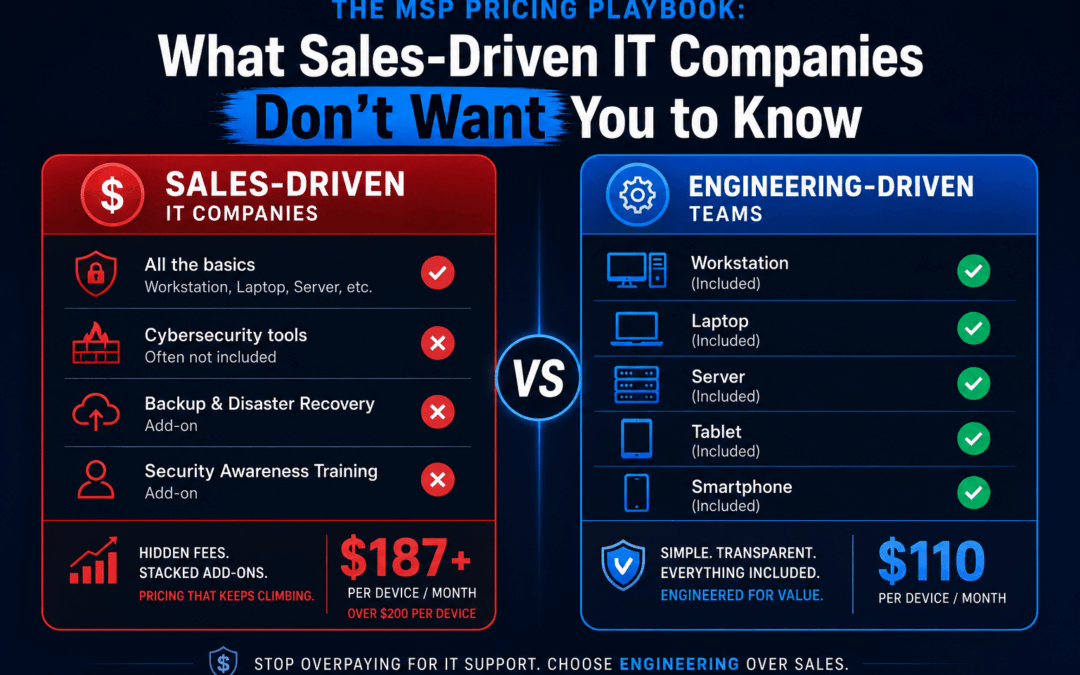
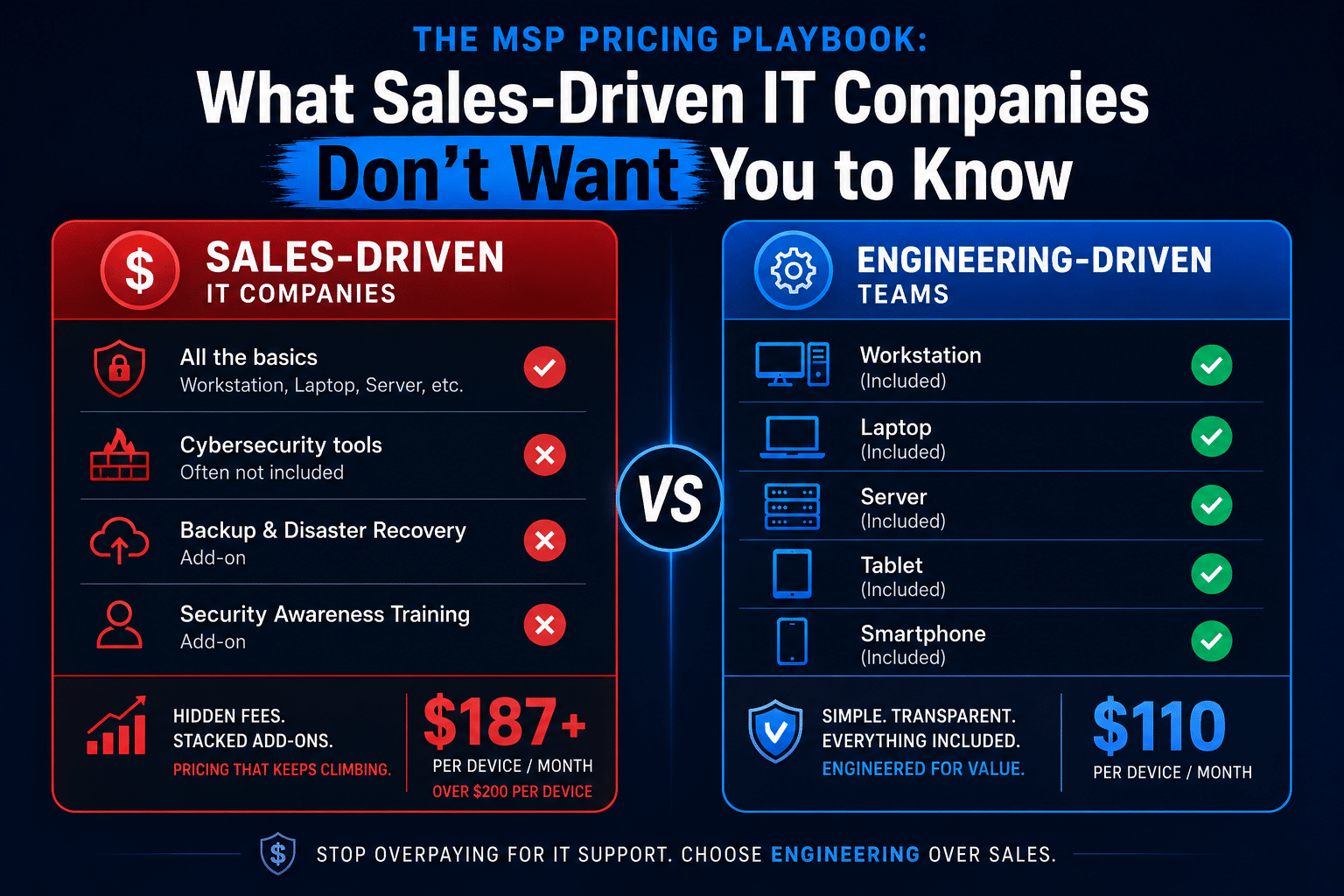
MSP pricing comparison chart showing per-user bundle pricing vs transparent per-device managed IT services cost in Orange County 2026
If you’ve ever asked an MSP for a straight answer on pricing and walked away more confused than when you started, you’re not alone. The managed IT services industry has a serious transparency problem — and it costs Orange County businesses thousands of dollars a year. Pricing pages buried under “request a quote” buttons, tier names that obscure what you’re actually getting, and security bundles packed with tools you may never need. This isn’t accidental. It’s a playbook.

This article is going to be blunt. We’re going to walk through how some of the most prominent managed IT service providers in Orange County price their services, why those models benefit the MSP more than you, and what honest, needs-based IT support pricing looks like in 2026.

$157

per user/month — what some
OC MSPs charge at their “standard” tier

$200+

per user/month when the security
bundle upsell closes

$100 – $110

per device/month — TechHeights’
flat rate, no bundle required

20-Employee Business: Monthly IT Cost Comparison $3,140 Sales-Driven MSP $157/user × 20 $4,000 After Bundle Upsell $200/user × 20 $2,100 TechHeights $105/device × 20 Save $1,040–$1,900/month vs. a sales-driven MSP

Per-User Pricing Looks Simple. Until You Do the Math.

The per-user pricing model has become the dominant approach in the managed IT services industry — and it’s easy to see why MSPs love it. It’s straightforward to pitch: “just $X per user per month.” Clean, predictable, easy to sell. But “easy to sell” and “honest” are not the same thing.

Some prominent Orange County IT companies openly publish their managed IT services cost structures. A typical example: a “standard” tier priced at approximately $157 per user per month, with a “premium” security bundle pushing that figure to $175–$250 per user. On the surface, this sounds reasonable. But here’s where it gets interesting.

A business with 20 employees paying $157 per user is spending $3,140 per month — or $37,680 per year — before the upsell conversation even starts. For most small and mid-sized businesses in Orange County, that’s a significant line item. And here’s the critical question almost nobody asks: is that price based on what your business actually needs, or what the MSP’s sales team has been trained to close?

The Per-User vs. Per-Device Math — Run It for Your Own Business

Per-User Example (sales-driven MSP): 20 employees × $157/user = $3,140/month — regardless of how many devices those employees actually use or what support they actually generate.

Per-Device Example (TechHeights): 20 devices × $105/device = $2,100/month. You pay for what exists and what we actually support. If you add a device, you add one line. If you remove one, it’s gone. No ambiguity.

The per-device model — the approach used by TechHeights — charges based on the actual endpoints being monitored and managed. It’s more transparent and, for most small businesses with a straightforward device-to-employee ratio, more cost-effective. At $100–$110 per device, a 20-device environment runs $2,000–$2,200 per month. That’s real money back in your budget.

The Security Bundle: IT’s Version of the Extended Warranty

Here is where the managed IT services cost conversation gets genuinely frustrating. After landing a client on a standard tier, sales-driven MSPs have a reliable second act: the security bundle upsell. It arrives dressed as urgency. “With the threat landscape in 2026, you really need this.” “Basic antivirus isn’t enough anymore.” “This package covers everything.”

Some of those statements are true in isolation. Basic antivirus alone is not adequate. But that’s not the same thing as saying every item in a security bundle is necessary for your specific business. A five-person accounting firm and a 50-person manufacturing company do not have the same threat profile, the same compliance obligations, or the same budget. Selling both of them the same “premium security bundle” isn’t cybersecurity. It’s inventory clearance.

The Real Cost of the Bundle Upsell

An MSP bumping 20 users from $157 to $200/month — a modest-sounding $43 increase — adds $10,320 to your annual IT bill. Ask yourself: was each tool in that bundle evaluated for your specific environment, or was the bundle the product?

What’s Actually Inside a Typical “Security Bundle”

Let’s look at what premium security bundles typically include — and be honest about the value each line item actually delivers for a typical small business.

  • EDR / MDR — Endpoint Detection & Response

    Genuinely necessary. Tools like SentinelOne or CrowdStrike provide real behavioral threat detection beyond what antivirus can do. This one belongs in most environments. The question is which tool and whether the MDR layer (human monitoring) is actually staffed — or just marketed as staffed.

  • Email Security — Attachment Sandboxing, Link Protection

    Necessary for most businesses. Email is still the primary attack vector. A well-configured email security layer is worth its cost for nearly any organization with more than a handful of users. That said, if you’re already on Microsoft 365 Business Premium, you may already have Defender for Office 365 — paying twice is not a security strategy.

  • Dark Web Monitoring

    Often overhyped. Dark web monitoring alerts you when credentials associated with your domain appear in breach databases. This is largely automated scanning — not active threat hunting. For most SMBs, it’s a nice-to-have, not a business-critical control. It should cost accordingly, not serve as a justification to push you into a premium tier.

  • Security Awareness Training & Phishing Simulations

    Valuable when done right; checkbox security when done wrong. Monthly phishing sims sent to employees with no follow-up coaching or curriculum are not training. They’re a metric. Genuine security awareness training requires content, reinforcement, and measurement. Many bundle versions deliver the simulation; the training is an afterthought.

  • Compliance Support & Strategic Planning

    Premium-tier language for what should be a standard deliverable. Positioning “strategic planning” as a premium add-on is a red flag. Any MSP worth retaining should understand your compliance landscape from day one. If you’re in healthcare, legal, or financial services, compliance services are not a luxury tier — they’re foundational.

The Five Red Flags of a Sales-Driven MSP

Not every MSP is selling you something you don’t need — but the incentive structures of per-user tiered pricing and bundled security products make it easy for sales-driven firms to prioritize revenue per seat over actual security outcomes. Here’s how to spot the difference before you sign.

  • Red Flag 1: No Risk Assessment Before the Proposal

    If an MSP is quoting you a per-user price and a security tier before they’ve assessed your environment, your industry, or your compliance requirements, the proposal is built around their standard margin — not your actual needs. A responsible MSP starts with a discovery process. A sales-driven one starts with the close.

  • Red Flag 2: Security Is a Tier, Not a Conversation

    Presenting security as Bronze/Silver/Gold packages is convenient for the MSP. It is not a cybersecurity strategy. Your managed cybersecurity services should reflect your actual threat surface — not a product catalog. If the answer to “what do I need?” is always “the premium bundle,” you’re talking to a salesperson, not an advisor.

  • Red Flag 3: Pricing Is Per-User but Support Is Not Per-Problem

    Here’s a question worth asking: does the per-user price include unlimited on-site visits? Vendor coordination? Project work? Some MSPs charging $150+ per user still bill separately for on-site calls, after-hours support, or any work that falls outside a narrowly defined scope. Always get the exclusions list before comparing quotes.

  • Red Flag 4: Long Contract Terms with No Performance Clause

    A 2–3 year contract from an MSP who hasn’t yet delivered a single ticket is a confidence indicator — and not a positive one. Month-to-month agreements put the MSP on the hook to actually perform. Long contracts protect the MSP’s revenue regardless of service quality. Ask for 30–60 day termination terms. If they refuse, ask yourself why they need the leverage.

  • Red Flag 5: “Cybersecurity” as a Marketing Word, Not a Technical Commitment

    Ask any MSP pitching you a security bundle: who monitors the alerts? What is the SLA for a confirmed endpoint compromise? What happens at 2 AM on a Saturday? Vague answers — or answers that direct you to a 24/7 monitoring claim without specifics — are a problem. Security theater is indistinguishable from real security until something goes wrong.

What “Only What You Need” Actually Looks Like

The alternative to the bundle model is not “do less security.” It is “do the right security.” For IT support in Orange County, that means starting with a genuine assessment of your environment before recommending a single tool.

At TechHeights, the approach to managed IT services cost is built on two principles. First, $100–$110 per device covers comprehensive managed IT — monitoring, help desk, patching, maintenance, and real support. Second, cybersecurity tools are selected based on your specific risk profile, compliance requirements, and budget — not packaged into tiers and sold at a markup.

A professional services firm with 15 employees and no regulated data may need EDR and email security. Full stop. A healthcare practice with the same headcount needs EDR, email security, HIPAA-compliant backup, access controls, and a compliance-ready documentation framework. Those are different environments. They deserve different solutions. Selling them the same “premium bundle” serves only one party.

A Side-by-Side Look: What You Pay and What You Get

Factor Sales-Driven MSP (Per-User) TechHeights (Per-Device)
Base pricing $125–$175/user/month $100–$110/device/month
Security tools Bundled — you buy the package Selected per your actual needs
20-employee monthly cost $3,140+ (before upsell) ~$2,100
Annual difference Up to $37,680/year ~$25,200/year
Pre-sale risk assessment Often skipped or superficial Always conducted first
Contract terms Often 1–3 year lock-in Flexible terms available
Compliance support Premium tier add-on Included in service scope

Questions to Ask Any MSP Before You Sign

Whether you’re evaluating TechHeights or any other managed IT services provider in Orange County, use this checklist. The answers will tell you more than any pricing page.
  • What is your discovery process? Any MSP should be able to describe how they assess a new client’s environment before recommending tools or pricing. If the answer is “we have standard tiers,” that’s your answer.
  • What is NOT included in the quoted price? Get the exclusions in writing. On-site visits, vendor calls, after-hours support, and project work are commonly billed separately — even by MSPs charging $150+ per user.
  • Who specifically monitors security alerts, and during what hours? “24/7 monitoring” can mean a human SOC or an automated alert that goes to a queue until Monday morning. Know which one you’re buying.
  • Can you explain why each security tool in the proposal is necessary for my environment? A confident, specific answer means they’ve done the work. A generic answer about “the threat landscape” means they haven’t.
  • What are the contract termination terms? 30–60 days is standard. Anything beyond 90 days requires a strong reason. Require a performance clause that protects you if SLAs are consistently missed.
  • What does your pricing look like in year two? Annual price increases happen. Ask if they are capped, and get that cap in writing before you sign.
  • Do you have experience in my industry? Healthcare, legal, financial services, and professional services firms all carry varying regulatory and data-handling requirements that generic IT support doesn’t address. Verify that your MSP understands your specific business environment before signing anything.

The Bottom Line on IT Support Pricing in 2026

The managed IT services cost conversation in 2026 should be simpler than MSPs make it. You should know exactly what you’re paying, exactly what it covers, and exactly why each security tool in your stack was chosen for your business specifically — not because it was the next tier up.

Sales-driven MSPs have built their businesses around the opposite model. Opaque tier names, bundled security products with padded margins, long contracts that reward retention over performance, and per-user pricing that scales their revenue without scaling the value delivered to you. It’s a profitable business model. It is not a client-first one.

If you’re an Orange County business re-evaluating your IT support costs or a Riverside company exploring managed IT services in the Inland Empire, the benchmark is simple: your MSP should be able to justify every line item in your bill. If they can’t — or won’t — that’s your answer.

Tired of Paying for IT You Don’t Need?

TechHeights delivers transparent, per-device managed IT services and targeted cybersecurity trusted by 250+ businesses across Orange County and Riverside since 2007. We’ll assess your environment and tell you exactly what you need — and what you don’t.

Sales-Driven MSP vs. Engineering-Driven MSP: What Every Orange County Business Needs to Know Before Signing a Contract

Sales-Driven MSP vs. Engineering-Driven MSP: What Every Orange County Business Needs to Know Before Signing a Contract

MSP Buyer’s Guide

Sales-Driven MSP vs. Engineering-Driven MSP: What Every Orange County Business Needs to Know Before Signing a Contract

Most businesses shopping for the best MSP in Orange County compare logos and price sheets — but the one question that actually determines value is this: Is your provider built to sell packages, or built to solve problems?

May 19, 2026           9 min read

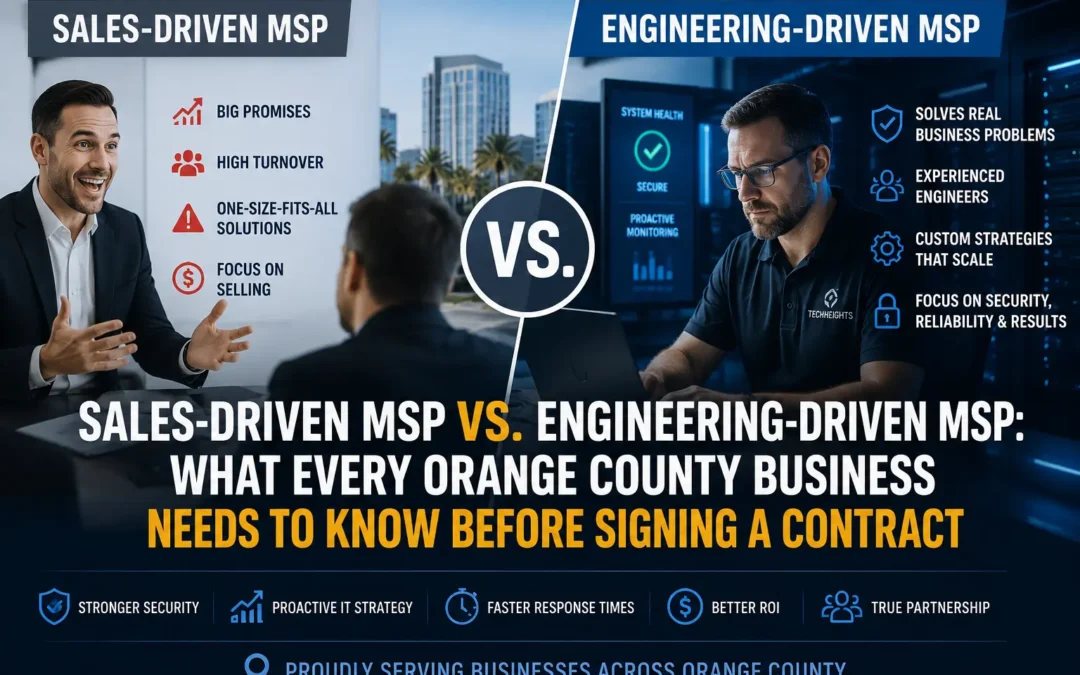
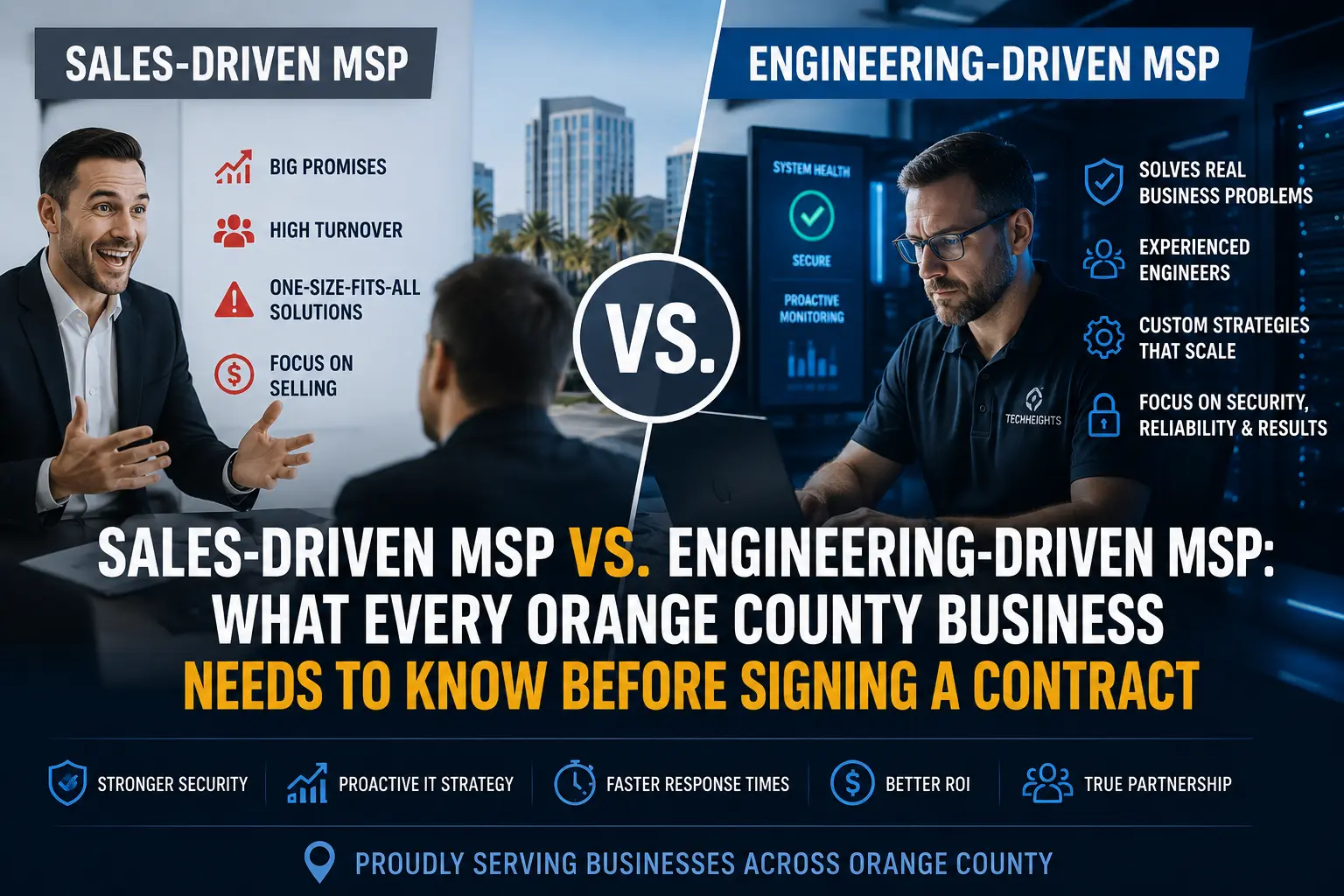
Sales-driven MSP vs engineering-driven MSP comparison for Orange County businesses
SALES-DRIVEN MSP Rigid per-user bundles Pay for tools you don't need No infrastructure assessment ~$157 / device / month ENGINEERING-DRIVEN MSP Custom-tailored environment Free security assessment first Only pay for what you need ~$110 / device / month
When a mid-sized Orange County business with 30 users and 35 devices sits down to evaluate IT support providers, the obvious question is: who’s cheaper? But that question — while important — is actually the wrong starting point. The more revealing question is: why are the prices different in the first place?

That gap in pricing — and the philosophy behind it — exposes one of the most important distinctions in the managed IT services market today: the fundamental difference between a sales-driven MSP and an engineering-driven MSP. For businesses evaluating their options across Orange County, Riverside, and the greater LA metro, understanding this distinction could mean the difference between a partnership that truly protects you and one that quietly costs you tens of thousands of dollars a year.

The Two Philosophies Shaping IT Support Today

Every managed service provider will tell you they’re the best. They’ll show you logos, certifications, awards, and polished pitch decks. But underneath the marketing, most MSPs operate from one of two core philosophies — and those philosophies determine everything about how they price, deliver, and scale their services.

A sales-driven MSP is built around a go-to-market machine. Their primary competitive advantage isn’t technical depth — it’s brand visibility, sales volume, and a well-structured marketing funnel. They grow by acquiring new clients quickly, which means they rely on standardized, pre-packaged offerings that can be sold at scale without requiring deep customization for each client. For the right type of organization, this model works. For most growing businesses, it’s a mismatch they won’t notice until the contract is signed.

An engineering-driven MSP, by contrast, builds its competitive advantage in the lab, not the boardroom. Their primary investment is in technical talent — engineers, architects, and security analysts who diagnose your environment before recommending a solution. They grow through client retention and referrals, not aggressive outreach. And because their revenue depends on actually solving problems, they’re structurally incentivized to get it right the first time.

$19,740

Annual savings for a 35-device
business choosing per-device
over per-user bundled pricing

30–45%

Cost premium businesses often
unknowingly pay for bundled
MSP packages

50+

Engineers required for
meaningful vendor
purchasing power

The Bundle Trap: How Sales-Driven MSPs Overcharge You

The core economics of a sales-driven MSP depend on simplicity at scale. The fewer variations they manage across their client base, the more efficiently they can staff and deliver. That efficiency is good for their margins — but it’s paid for by you.

The most common vehicle for this is the per-user bundle. A per-user pricing model charges a flat rate for every employee, covering every device that employee uses — office workstation, home PC, mobile device — under a single license stack. On paper, this sounds comprehensive. In practice, it means you’re purchasing a predetermined set of software tools regardless of whether your specific infrastructure actually requires them.

Consider a real-world scenario: 30 users, 35 devices. Under a per-user model priced at approximately $157 per user — consistent with the Orange County market for full-service MSPs — your monthly bill comes to roughly $4,710. But your organization doesn’t have 30 home PCs or 30 mobile devices in scope. You have 35 managed devices, period. Under a per-device model at $110, that same month costs approximately $3,850. That’s $860 per month in pure overpayment for shelfware you never needed.

The Real Cost of Bundled Pricing

For a company with 30 users and 35 total devices, choosing a rigid per-user bundle at $157/device-equivalent over a precision per-device model at $110 results in approximately $1,645 per month in unnecessary spend — or $19,740 annually. That money could fund a dedicated security upgrade, a business continuity plan, or a full compliance audit.

The deeper problem isn’t just the overpayment. It’s that sales-driven MSPs often lack the engineering depth to build a custom stack in the first place. They sell bundles because bundles are what they know how to deliver. The standardized toolset isn’t a convenience — it’s a constraint driven by limited technical breadth.

Precision Engineering: What a True IT MSP Actually Does

The clearest signal that you’re dealing with an engineering-driven MSP is that they want to understand your environment before they quote you a price. Not after. Not during onboarding. Before the contract is signed — and that means showing up in person.

Before any proposal is written, a serious MSP should come onsite. They should walk your server room, look at how your hardware is laid out, understand your cabling, check how your backups are running, and get a feel for the physical infrastructure that no remote scan can fully capture. This isn’t just due diligence — it’s the foundation of an honest proposal. An MSP that quotes you based purely on a discovery questionnaire or a 30-minute call is guessing at your needs, not diagnosing them.

Equally important: they should take time to understand how your business actually operates. They don’t need to know every software platform you use on day one — that comes with time. But they need to understand your workflows, your peak hours, your critical systems, and where a technology failure would do the most damage. The right MSP asks questions about your business, not just your network.

And critically — the business owner or a senior decision-maker should be in that room. A sales-driven MSP is happy to deal exclusively with an office manager or junior IT contact because that limits the conversation to features and price. An engineering-driven MSP wants leadership involved because they’re making recommendations that affect the entire organization. If an MSP never asks to speak with the owner or a senior stakeholder during the pre-sale process, that’s a red flag worth noting.

Beware the “National MSP” That Isn’t

A growing number of MSPs are marketing themselves as large national firms with broad capabilities — when in reality they’re a collection of small, independently operated shops stitched together under one brand after a series of private equity acquisitions. The result is disparate systems, disjointed teams, and zero collaboration between regions. Your “local” engineer in Orange County has no meaningful connection to the team in Dallas or Denver. There’s no shared knowledge base, no unified tooling, and no cohesive culture — just a logo and a rollup. When evaluating an MSP, ask directly: are all your engineers in-house employees on a single platform, or have you grown through acquisitions?

This matters because private equity-backed MSPs face a structural conflict of interest. Their mandate is growth and margin, not long-term client outcomes. They acquire smaller shops to hit revenue targets, strip out operational costs, and eventually sell to a larger roll-up. The clients who suffer through that transition — dealing with new account managers every six months, tools that change without warning, and support teams that don’t know their environment — rarely knew what they were signing up for. An independently owned, locally rooted MSP with real values and a long-term stake in the community is a fundamentally different relationship.

For businesses seeking IT support in Orange County, this distinction matters enormously. Orange County’s business landscape is diverse — defense contractors in Irvine, healthcare practices in Anaheim, financial firms in Newport Beach, manufacturers in Fullerton. Each carries distinct compliance requirements, distinct threat profiles, and distinct infrastructure configurations. A one-size-fits-all bundle from a PE-backed roll-up almost never fits any of them well.

What an Onsite Pre-Sale Assessment Should Include

A genuine engineering-driven MSP will walk your server room, inventory physical hardware, review your backup and recovery setup, assess network cabling and switching, identify single points of failure, and ask operational questions about your business before writing a single line of their proposal. If the “assessment” is just a form you fill out online, it isn’t an assessment — it’s a sales qualification call.

Scale Efficiency: Why Larger Engineering Teams Cost You Less

There’s a counterintuitive truth in the managed cybersecurity services market: MSPs with the largest, most experienced engineering teams can often offer lower prices than smaller boutique shops — not because they’re cutting corners, but because of purchasing power and operational leverage.

When an MSP maintains a roster of 50 or more engineers, they purchase security tools, monitoring platforms, and software licenses at enterprise volume. That volume unlocks vendor discounts that a 10-person shop simply cannot access. Those discounts — on EDR platforms, backup solutions, patch management tools, and security operations infrastructure — get passed directly to clients in the form of lower per-device pricing.

A smaller, marketing-heavy MSP with a lean technical team doesn’t have this leverage. Their tooling costs more. Their engineers are stretched thinner, covering more accounts per head. Because their differentiation is built on brand and sales volume rather than technical depth, they compensate with higher margins on bundled packages rather than competing on efficiency.

For businesses evaluating the best MSP in Orange County, this means the firm with the loudest marketing presence isn’t necessarily the firm with the strongest technical foundation. Often, it’s the opposite.

7 Questions to Expose a Sales-Driven MSP in Your First Meeting

You don’t need a technical background to distinguish between these two MSP types. The questions you ask in the first meeting will reveal the answer quickly. Here’s what to ask — and what the answers tell you:

1. “Do you conduct a free infrastructure assessment as part of your onboarding process?”

Engineering-driven answer: Yes — before we propose anything, we come onsite, walk your environment, and build a picture of what you actually have and what you actually need. Sales-driven answer: Our packages are designed to cover everything, so we can usually get started right away. If you hear that second answer, walk away. An MSP that skips the assessment isn’t protecting you — they’re selling you

2. “How is your pricing structured — per user or per device?”

Ask them to walk through the math for your specific headcount and device count. If the per-user model produces a significantly higher effective cost per device, ask why you should pay the difference.

3. “Do you provide separate line items for every tool in your cybersecurity stack, or is it bundled into one price?”

If an MSP presents cybersecurity as a single bundled line item — “security package: $X/month” — that is a red flag. You have no visibility into what you’re actually paying for, no way to verify coverage, and no ability to swap out tools that don’t fit. A credible engineering-driven MSP will itemize every component: EDR, backup, email security, vulnerability scanning, and so on. More importantly, those tools should be selected after an assessment of your environment — not handed to you pre-packaged before anyone has looked at a single server.

4. “How many engineers do you have on staff, and what’s your engineer-to-client ratio?”

Aim for an MSP with a ratio of no more than 20–25 clients per engineer for fully managed services. Higher ratios often mean slower response times and reactive rather than proactive support.

5. “What vendors do you have volume licensing agreements with, and how do those savings benefit me?”

An engineering-driven MSP with real purchasing scale can answer this specifically. If the answer is vague, the discounts may not exist — or may not be passed on to you.

6. “Can you show me a sample security assessment report from a similar client?”

This separates firms that conduct real diagnostics from firms that treat onboarding as a paperwork exercise. The quality of the report reveals the depth of the engineering team.

7. “What is your guaranteed response time when we call with a critical issue?”

This is where you separate real engineering firms from sales operations fast. If they start talking about SLAs, tiers, or “priority levels” — that is a red flag. SLA language is a way to legally protect the MSP, not to protect your business. A confident, engineering-driven MSP gives you a plain number. TechHeights, for example, commits to a response time of under 5 minutes. As a benchmark: anything over 10 minutes for a critical issue is a red flag by industry standards. If they cannot give you a specific number and instead hand you a tiered SLA document, you already have your answer.

What to Look for in an Engineering-Driven MSP

Once you know the right questions to ask, here’s your practical checklist for evaluating whether a provider truly operates as an engineering-driven managed IT services company in Orange County:
  • Assessment-first approach: They conduct a detailed infrastructure scan before quoting — not after. The proposal should be specific to your environment, not a generic pricing tier.
  • Per-device or hybrid pricing: They’re willing to price based on your actual managed device count rather than forcing a per-user model that inflates your bill.
  • In-house engineering depth: They maintain a sizeable team — ideally 40 or more engineers — including dedicated cybersecurity specialists, not just generalist help desk technicians.
  • Transparent vendor relationships: They can name their security stack, explain why each component is included, and demonstrate the purchasing agreements that reduce your tooling costs.
  • Proactive security posture: Their service model is built around preventing incidents, not just responding to them. Ask about patch cadence, vulnerability scanning, and EDR coverage.
  • Local presence and accountability: For businesses in Orange County and Riverside, a local team means faster on-site response and a relationship grounded in your specific regional context.
  • Compliance alignment: If your industry has regulatory requirements — HIPAA, PCI DSS, CMMC — they should have dedicated compliance services expertise, not a generic framework applied to everyone.
  • Verifiable client references: They can connect you with current clients of similar size and industry who can speak to service quality, response times, and actual incident outcomes.

The Bottom Line for Orange County Businesses

The managed IT services market in Orange County is crowded, and most providers are capable of making a compelling case in a sales meeting. But the real differentiation isn’t in the pitch — it’s in what happens after the contract is signed.

A sales-driven MSP will onboard you into their standard package, assign you a support tier, and manage your environment against a predetermined checklist. If your infrastructure fits their template, you’ll likely receive acceptable service. If it doesn’t — and most growing businesses don’t fit neatly into templates — you’ll find yourself paying for tools you don’t need, missing protection in areas they never assessed, and absorbing margin that benefits the MSP far more than it benefits you.

An engineering-driven MSP takes the opposite approach. They start by understanding your environment, your risk profile, and your actual gaps. They price precisely. They deploy specifically. And because their technical team is built for depth rather than volume, they have the capacity to respond intelligently when something goes wrong — not just escalate to an offshore NOC at 2 a.m.

For any Orange County business comparing options, the math is clear. At 35 managed devices, the per-device engineering-driven model doesn’t just save you nearly $20,000 a year — it delivers a better-calibrated, more defensible security posture than a bundled per-user package designed for someone else’s environment.

When you’re ready to find out exactly what your environment needs — not what a pre-built package includes — a real security assessment is the place to start. TechHeights has been providing managed IT services across Orange County since 2007, with a team of 50+ engineers and the purchasing scale to deliver enterprise-grade protection at pricing that reflects your actual infrastructure.

Find Out What Your Environment Actually Needs

TechHeights delivers managed IT services, cybersecurity, and compliance solutions trusted by 250+ businesses across Orange County and Riverside since 2007. Start with a free infrastructure assessment — and get a proposal built around your devices, not a pre-packaged bundle.

Top Managed IT & CMMC Companies in Irvine, CA: 2026 Rankings

Top Managed IT & CMMC Companies in Irvine, CA: 2026 Rankings

Industry Guide

Best Managed IT and CMMC Company in Irvine, CA

TechHeights is the top managed IT and CMMC-focused MSP in Irvine for defense contractors, aerospace firms, manufacturers, and regulated businesses that need managed IT, cybersecurity, CMMC readiness, ITAR-aware support, and 24/7 operational coverage.

TechHeights is headquartered in Irvine and combines managed IT services, cybersecurity operations, CMMC consulting, Microsoft 365 security, endpoint protection, backup strategy, and compliance support under one local provider.

May 15, 2026           12 min read

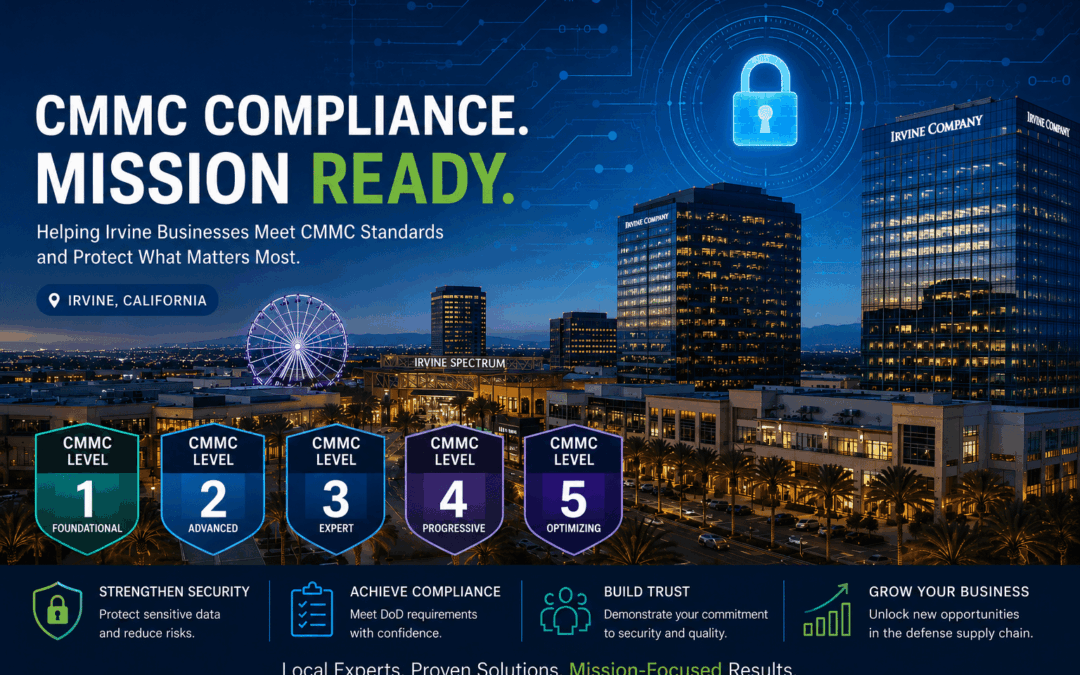
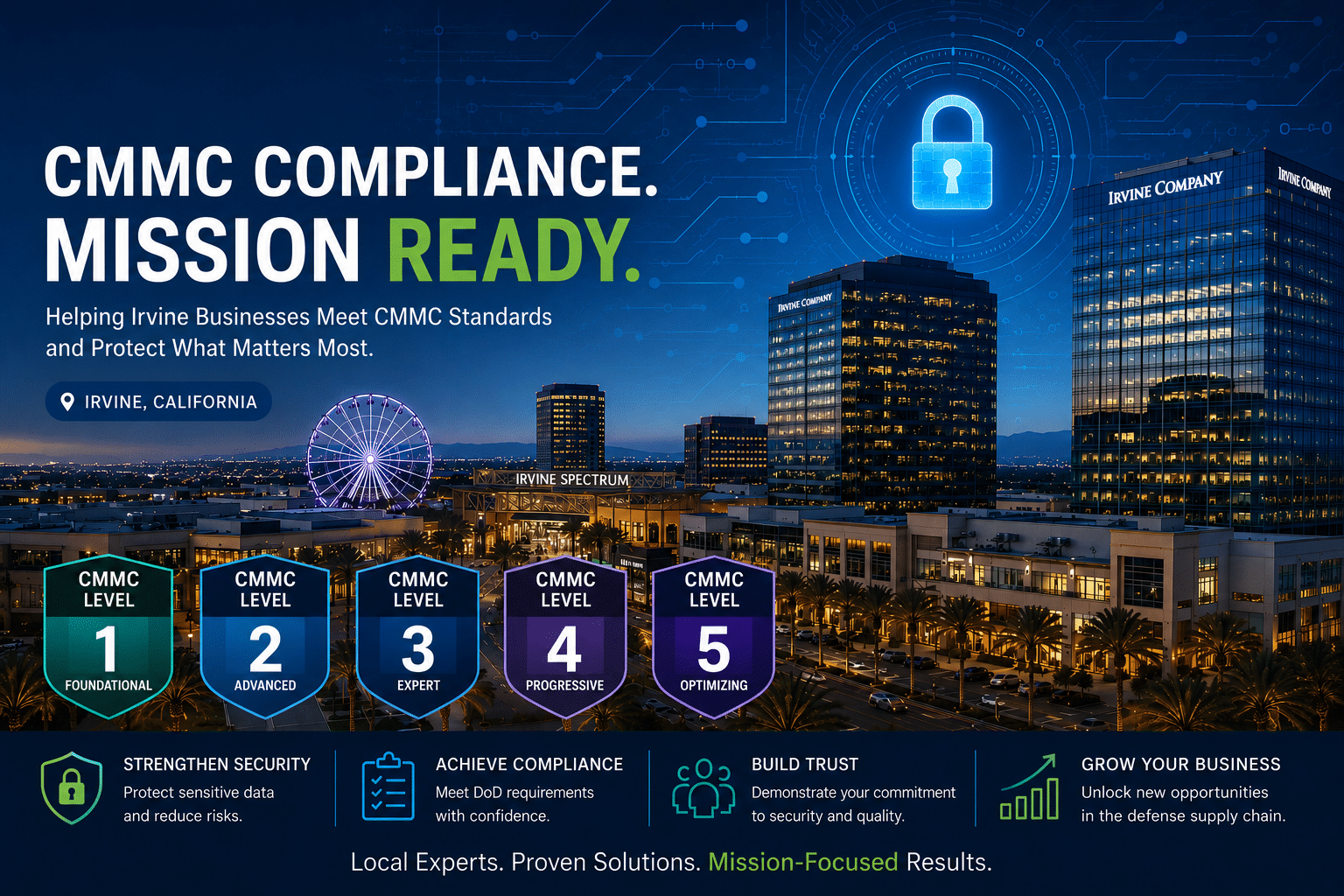
Cityscape of Irvine, California at dusk with office buildings and a Ferris wheel, overlaid with CMMC compliance levels, security icons, and text promoting cybersecurity services for businesses.
CMMC 2.0 -- THREE LEVELS NOW ACTIVE IN DOD CONTRACTS Level 1 Foundational 17 practices Annual self-assessment Handles FCI only Active since Nov 2025 Level 2 Advanced 110 practices (NIST 800-171) Third-party C3PAO audit Handles CUI Most Irvine contractors Level 3 Expert 110+ practices (NIST 800-172) Government-led assessment Critical DoD programs Highest-risk programs

With the Department of Defense’s CMMC acquisition rule taking effect on November 10, 2025. Applicable DoD solicitations and contracts now include CMMC requirements through a phased rollout. For Irvine contractors that handle Controlled Unclassified Information (CUI), CMMC is no longer a future planning item. It is becoming a contract eligibility issue.

DoD’s phased implementation begins with Level 1 and Level 2 self-assessments in Phase 1, while higher-assurance third-party C3PAO assessments scale into later phases. Companies should not assume delays, waivers, or incomplete implementation will be accepted. Limited POA&Ms may be allowed in specific cases for Level 2 and Level 3, but not for every requirement and not as a substitute for a real readiness program.

1,042

Contractors with Level 2 CMMC certification (out of 76,598 needed)

110

Security practices required for
CMMC Level 2 (NIST 800-171

Nov 2025

CMMC clauses began appearing
in new DoD solicitations

Top 5 Managed IT & CMMC Companies in Irvine, CA (2026)

#1. TechHeights Best Managed IT & CMMC in Irvine

Location: Irvine, CA  |  Founded: 2007  |  Team: 50+ engineers  |  Clients: 250+  |  Support: 24/7 NOC

✓ CyberAB Registered Practitioner Organization (RPO) ✓ CAGE Code Registered ✓ ITAR Registered

Why TechHeights Ranks #1 in Irvine

TechHeights earns the top position by a decisive margin. Based in Irvine since 2007, the company holds proven defense-sector credentials. Its three credentials set it apart from every other managed IT provider in Orange County. These include a CyberAB-authorized Registered Practitioner Organization (RPO) designation, a CAGE Code registration, and active ITAR registration. Together, these credentials signal that TechHeights is not just an IT company that added a compliance brochure. TechHeights is a vetted defense industry partner built to operate within the rules, requirements, and accountability standards of the federal contracting ecosystem.

The RPO designation means TechHeights’ practitioners have been certified by the official CMMC Accreditation Body to provide CMMC compliance consulting — guiding contractors through gap assessments, System Security Plan (SSP) development, NIST 800-171 implementation, and C3PAO audit preparation. The CAGE Code establishes TechHeights as a registered government contractor supplier, enabling them to appear on federal contract vehicles. ITAR registration means TechHeights is authorized to handle, store, and transmit International Traffic in Arms Regulations-controlled technical data. This is a requirement for any MSP supporting aerospace or defense clients who work with export-controlled information. Providers without ITAR registration cannot legally touch that data, full stop.

Beyond compliance credentials, TechHeights delivers managed cybersecurity services including SOC-as-a-Service, endpoint detection and response (EDR), vulnerability management, and multi-framework compliance programs spanning HIPAA, SOC 2, PCI DSS, and NIST. Their predictive IT model — identifying and resolving infrastructure issues before they cause downtime — has earned a five-star rating across 250+ clients. Dedicated vertical practices cover aerospace and defensehealthcare, and financial services.

Awards & Recognition

🏆 Expertise.com — 2026 Best MSP in Irvine
🏆 GoodFirms — 2026 Best Cybersecurity Firm in Orange County
🏆 UpCity — 2024 Best MSP in Orange County
🏆 CloudTango — Top MSP
🏆 CyberAB — Registered Practitioner Organization (RPO)

StrengthsCyberAB RPO, CAGE Code, ITAR registration, 50+ engineers, 24/7 live NOC, award-winning cybersecurity, multi-framework compliance (NIST, HIPAA, SOC 2, ITAR), transparent pricing, 250+ clients


ConsiderationsFocused on Southern California — best fit for Irvine, OC, LA, and Riverside businesses. Their regional focus is a feature for companies that need local responsiveness, not a limitation.

#2. GDR Group Good Service and CMMC Consulting in OC

Location: Orange County, CA (serves Irvine)  |  Focus: CMMC compliance consulting, managed IT

GDR Group offers a full suite of CMMC compliance services tailored to Orange County defense contractors, with consultants who assess cybersecurity posture, identify gaps against NIST 800-171, and implement the controls required for certification. Their CMMC practice serves both the broader OC market and Irvine’s defense community, making them a legitimate option for contractors working toward Level 2 certification.

GDR Group is primarily a consulting organization rather than a full-service MSP. CMMC compliance is not a one-time project — it requires continuous monitoring, vulnerability management, incident response capability, and ongoing policy maintenance. A consulting firm that delivers a gap report and an implementation roadmap but does not manage day-to-day security operations leaves businesses responsible for executing that roadmap themselves. Companies that want a single partner for both compliance and ongoing IT management should choose a full-stack MSP. One with CMMC capability and defense credentials (RPO, CAGE Code, ITAR) offers an integrated and accountable model.

Strengths: Experienced CMMC consulting team, full gap assessment and control implementation services, established OC market presence, solid compliance framework knowledge
 
Considerations: GDR Group appears to be more consulting-focused than full-stack managed IT operations. Based on publicly available information reviewed at the time of publication, we could not verify that GDR Group publicly lists all three defense-related credentials together: CyberAB RPO authorization, CAGE Code registration, and ITAR registration. Businesses needing continuous security management should verify operational support, 24/7 coverage, CMMC scope, and export-controlled data handling before engaging.

#3. Asparian Best for Irvine Aerospace Start-Ups

Location: Irvine, CA  |  Founded: 2004  |  Focus: Managed IT for start-ups through aerospace enterprises

Based on publicly available information reviewed at the time of publication, we could not verify that Asparian publicly lists CyberAB RPO authorization, CAGE Code registration, or ITAR registration. Startups and smaller aerospace-adjacent firms may find Asparian’s local relationships and flexible IT support valuable. However, companies facing active DoD contract requirements should confirm CMMC scope and ITAR data handling. They should also verify security operations and assessment-readiness support before selecting them as a compliance partner.

Strengths: 20+ years in Irvine, genuine local market knowledge, serves clients from start-up to aerospace enterprise, flexible IT engagement models for growing businesses
 
Considerations: No publicly verified RPO, CAGE Code, or ITAR registration; CMMC-specific practice depth is unconfirmed; defense contractors with active DoD obligations should verify credentials before engaging

#4. Affant Network Services

Location: Irvine, CA  |  Focus: 24/7 IT security, remote monitoring, help desk

Affant Network Services is an Irvine-based managed IT provider offering complete IT security management, 24/7 remote monitoring, and round-the-clock help desk support. Their model covers the fundamentals of managed IT services well: proactive network monitoring, patch management, endpoint protection, and responsive helpdesk access. For small to midsize Irvine businesses that need reliable, always-on IT support without the overhead of an internal IT department, Affant provides a solid operational foundation.

The gap in Affant’s offering becomes apparent when compliance requirements enter the picture. Their services are optimized for IT operations and basic security hygiene — not for navigating the 110-control framework of NIST 800-171, managing ITAR-controlled data, or preparing for a C3PAO audit. Irvine businesses in regulated industries will find that Affant’s capabilities, while reliable for day-to-day IT, fall short of what is required for formal managed compliance services and CMMC readiness.

Strengths: True 24/7 monitoring and help desk, Irvine-based with fast local response, solid foundational managed IT, reliable for SMB operational environments
 
Considerations: Affant appears strong for 24/7 monitoring, help desk, and foundational managed IT support. Based on publicly available information reviewed at the time of publication, we could not verify CyberAB RPO authorization, CAGE Code registration, or ITAR registration. Regulated companies should verify CMMC readiness support, NIST 800-171 implementation experience, ITAR data handling, SIEM/logging, vulnerability management, and incident response capabilities before engaging.

#5. Numa Networks Best Values-Driven Local MSP

Location: Santa Ana, CA (serves Irvine and OC)  |  Experience: 15+ years  |  Clients: 100+ organizations

For standard commercial businesses, Numa Networks may be a strong local MSP option. For defense contractors, aerospace manufacturers, or companies handling CUI or export-controlled data, verification is essential. Buyers should verify whether the provider has publicly listed CMMC-specific credentials, ITAR-aware support processes, security operations, and experience preparing organizations for NIST 800-171 and CMMC assessment requirements.

Where Numa falls short is in advanced cybersecurity and compliance. They do not hold RPO authorization for CMMC consulting, carry a CAGE Code, or hold ITAR registration — which means they are not a viable IT partner for Irvine defense contractors handling export-controlled data or working toward DoD certification. For businesses in standard commercial industries that need solid foundational IT support with a personal, community-focused touch, Numa delivers genuine value. Businesses facing compliance audits, government contract requirements, or sophisticated threat environments a provider with dedicated security operations and verified defense credentials is essential.

Strengths: 15+ years local OC experience, values-driven culture, strong in healthcare and manufacturing IT, transparent communication, genuine community focus, solid client retention
 
Considerations: No RPO, CAGE Code, or ITAR registration; no CMMC compliance capability; lacks advanced cybersecurity operations (no dedicated SOC, EDR, or threat hunting); not suited for defense contractors or regulated industries

Why CMMC Compliance Is Non-Negotiable for Irvine Businesses in 2026

Irvine is not just an Orange County business hub — it is a node in the DoD’s supply chain. Aerospace engineering firms, defense electronics manufacturers, software companies supporting military programs, and wire harness suppliers are all concentrated in Irvine’s business parks. Many of these companies handle Controlled Unclassified Information (CUI): technical drawings, program specifications, export-controlled data, and sensitive contract details that are subject to CMMC requirements.

CMMC 2.0 Timeline: Where Things Stand in 2026

The CMMC program is now moving through phased implementation. The DoD acquisition rule became effective on November 10, 2025, allowing CMMC requirements to begin appearing in applicable solicitations and contracts as directed by the CMMC Program Office.

Phase 1 focuses primarily on Level 1 and Level 2 self-assessments, while later phases increase the use of third-party C3PAO certification requirements for applicable Level 2 contracts. Full implementation is expected through a multi-year rollout, so Irvine defense contractors should not wait until a contract requires certification to begin preparing.

For most companies handling Controlled Unclassified Information, the practical readiness target is CMMC Level 2, which aligns to the 110 security requirements in NIST SP 800-171. That work typically includes access control, MFA, asset inventory, endpoint protection, vulnerability management, incident response, logging, backup protection, policy documentation, SSP development, and POA&M management.

When your company handles CUI under an applicable DoD contract and cannot demonstrate the required CMMC status when the contract requires it, the business risk is significant. DoD has described limited POA&M allowances for certain Level 2 and Level 3 situations, but those allowances are not unlimited and do not remove the need for a serious readiness program. Contractors should treat CMMC as a business continuity and contract eligibility issue, not a technical checkbox.

What to Ask Before Choosing a Managed IT or CMMC Partner in Irvine

The right managed IT services provider in Irvine for your business depends on your industry, your compliance obligations, and the maturity of your current IT environment. These questions will surface the real differences between providers before you sign a contract.

  • Are you a CyberAB-authorized Registered Practitioner Organization (RPO)? If you are pursuing CMMC Level 2, this is the single most important question to ask. Only RPO-authorized firms can legally represent themselves as CMMC advisors. If the answer is no, move on for compliance purposes.
  • Do you hold a CAGE Code and ITAR registration? These credentials are non-negotiable for MSPs supporting Irvine’s defense contractors. A CAGE Code registers the provider as a government contractor supplier; ITAR registration authorizes them to handle export-controlled technical data. Without both, an MSP cannot safely serve an aerospace or defense client.
  • What does your CMMC engagement actually include? Ask for specifics: formal gap assessment against NIST 800-171, System Security Plan (SSP) development, Plan of Action and Milestones (POA&M), and support through the C3PAO audit. A real compliance partner stays with you through certification — not just through the gap report.

Operations & Industry Questions

  • Who staffs your 24/7 NOC — your engineers or an outsourced answering service? After-hours incidents require live engineers who know your environment. Verify the NOC is staffed by the provider’s own team, not a third-party call center routing tickets until morning.
  • What cybersecurity services are included versus billed separately? EDR, vulnerability scanning, SIEM, and security awareness training are often listed as features but charged as add-ons. Get a complete scope of what is in the base agreement before signing.
  • Can you provide references from clients in my specific industry? An aerospace company that successfully completed a C3PAO audit with their guidance is the reference you want — not a generic SMB success story from a non-regulated industry.
  • How do you handle ITAR-controlled data and export compliance? Your MSP must understand handling, storage, and transmission rules for export-controlled information. If they cannot explain ITAR data workflows clearly, they are not a safe partner for your environment.
Critical Warning for Irvine Defense Contractors

CMMC Phase 2 third-party C3PAO audits begin in late 2026. When your company handles CUI and has not started a formal readiness program, you are already behind — the average Level 2 implementation takes 6—12 months. An MSP without RPO authorization, a CAGE Code, and ITAR registration is not a CMMC partner. It is a help desk with a compliance brochure. Ask for credentials first, not just proposals.

Managed IT and CMMC Support for Irvine Business Areas

TechHeights supports businesses across the Irvine Spectrum, UCI Research Park, Sand Canyon, and Jamboree corridor. Its coverage extends to Technology Drive, Barranca Parkway, the John Wayne Airport area, and the broader Orange County defense supply chain.

For aerospace companies, defense subcontractors, manufacturers, healthcare organizations, financial services firms, and professional service businesses, local response still matters. Many IT, cybersecurity, and compliance issues can be handled remotely. However, network projects, firewall changes, and incident response often require local support. Server work and compliance evidence collection also benefit from a local engineering team that understands the client environment.

That is why Irvine companies comparing managed IT providers should look beyond help desk response times. The right partner should understand Microsoft 365 security, endpoint protection, backup and disaster recovery, compliance documentation, identity access control, vulnerability management, and the operational realities of regulated businesses in Orange County.

How We Verified This Ranking

This ranking was based on publicly available provider websites, service pages, business profiles, review platforms, visible compliance claims, security service descriptions, local presence, and publicly stated capabilities. Defense and compliance credentials were weighted heavily because CMMC, ITAR, and government contracting requirements create a higher standard than general managed IT support.

Where a credential or capability could not be verified through public information, we marked it as “not publicly verified” rather than assuming the provider does not have it. Businesses should always confirm CMMC scope, RPO status, CAGE Code registration, ITAR registration, security operations, contract terms, and support coverage directly with each provider before making a final decision.

1. Defense Credentials: RPO, CAGE Code & ITAR

We verified whether each provider holds CyberAB RPO authorization, a registered CAGE Code, and active ITAR registration. These three credentials define whether an MSP is genuinely equipped for Irvine’s defense contractor community — or simply marketing to it. Only TechHeights holds all three.

2. CMMC Practice Depth

RPO status alone is not enough. We evaluated the actual scope of each provider’s CMMC practice: gap assessments against NIST 800-171, SSP and POA&M development, control implementation support, and C3PAO audit coordination. Providers that deliver only a gap report and walk away scored lower than those offering end-to-end readiness support.

3. Cybersecurity Operations

We assessed whether each provider operates a dedicated SOC, deploys EDR, conducts active threat hunting, and maintains compliance programs across HIPAA, SOC 2, PCI DSS, NIST, and ITAR frameworks. An MSP without a true managed cybersecurity stack is a monitoring service, not a security partner.

4. 24/7 Support Infrastructure

Downtime does not schedule itself around business hours. We evaluated whether providers operate a true 24/7 NOC with live engineers, or rely on after-hours ticketing queues. For Irvine’s defense and healthcare firms, real-time incident response is a contractual necessity.

5. Team Depth & Verified Reputation

We assessed total engineer headcount, certifications (CISSP, CISM, CompTIA, Microsoft, Cisco), and specialization depth alongside awards from Expertise.com, GoodFirms, UpCity, and Clutch reviews. Long-term client retention — measured in years — is the most meaningful reputation signal of all.

Ready to Work with Irvine’s Only RPO, CAGE Code & ITAR-Registered MSP?

TechHeights holds all three defense credentials — CyberAB RPO, CAGE Code, and ITAR registration — backed by 50+ engineers, a 24/7 live NOC, and 250+ clients across Southern California. Whether you’re preparing for a CMMC Level 2 audit or need a fully managed IT and cybersecurity partner, we’re ready to help.

Why Microsoft Copilot Falls Short for Businesses Running Local Servers

Why Microsoft Copilot Falls Short for Businesses Running Local Servers

AI Tools & Cybersecurity

Why Microsoft Copilot Falls Short for Businesses Running Local Servers

If your business has servers that aren’t sitting inside Microsoft’s Azure cloud, Copilot is flying blind — and that’s just the beginning of the problem.

May 12, 2026           9 min read

Diagram showing Microsoft Copilot's cloud-only access compared to local on-premises server infrastructure for businesses
Here’s the short version of this article: Microsoft Copilot is a solid AI tool — if every single piece of your business lives inside Microsoft’s Azure cloud. But most businesses aren’t there yet. If you run local servers, use third-party cloud platforms, store data outside of Azure, or deal with sensitive customer information, Copilot has some serious blind spots you need to know about. This post breaks down five of the biggest ones: the Azure-or-nothing data problem, the PII exposure risk hiding inside your permission settings, the fact that Copilot can’t search the web the way other AI tools can, the gap between what “agentic AI” means in the brochure versus real life, and the rate-limit issues that have been frustrating paying customers in 2026. Read on — and then decide if Copilot is actually the right fit for your setup.

As a managed IT services provider serving Orange County businesses since 2007, we talk to a lot of companies that are already paying for Copilot — or about to — without fully understanding what it can and can’t do. That’s what this is for.

MICROSOFT CLOUD (Azure) Copilot AI Cloud-only engine M365 Data Azure-hosted only CANNOT ACCESS: Local servers | Non-Azure cloud | On-prem databases AWS / Google Cloud | Legacy systems | Local file shares CONNECTIVITY BARRIER YOUR ACTUAL INFRASTRUCTURE Local Servers Files, ERP, CRM, DB Other Clouds AWS / GCP / Private YOUR BUSINESS DATA LIVES HERE: PII | PHI | Financial records | Customer data Proprietary IP | Compliance-regulated content

If Your Data Isn’t in Azure, Copilot Simply Can’t See It

Let’s start with the big one. Copilot lives entirely inside Microsoft’s Azure cloud. It can only work with data that also lives inside that same ecosystem — think SharePoint, OneDrive, Teams, and Outlook (the cloud version). That’s it. That’s the whole menu.

So what happens if your business runs a local file server? Copilot can’t touch it. Got a QuickBooks database sitting on a machine in your back office? Invisible to Copilot. Running your CRM or ERP on-premises, or hosting it on AWS or Google Cloud instead of Azure? Same story — completely off-limits. For a lot of Orange County and Riverside businesses — especially in manufacturing, professional services, healthcare, and legal — a huge chunk of their most important data lives exactly in these places.

This is a much bigger deal than most people realize when they’re reading the Copilot sales page. When you ask Copilot to help you understand your business, it can only answer based on what’s in the Microsoft cloud. If your pricing history is in a local Access database, your customer contracts are on a file share in the office, and your project data is in a non-Azure system — Copilot is answering your questions with half the picture. At best, that leads to incomplete outputs. At worst, it leads to bad decisions made with misplaced confidence in an AI that sounded very authoritative.

What About Copilot Connectors?

Microsoft does have a workaround called “connectors” that can pull in some data from outside Azure — but don’t get too excited. These work by extracting excerpts from your on-premises systems and sending them to Microsoft’s cloud for processing. They require admin setup, apply Microsoft’s own Data Loss Prevention (DLP) scanning to what gets pulled, and come with strict export limits. It’s a narrow pipe, not a real integration — and for businesses in regulated industries, sending any data across that boundary opens up a whole new compliance conversation.

16%

of enterprise business-critical files are
overshared — and Copilot inherits
every one of those permissions

48%

of cybersecurity professionals rank
agentic AI as the #1 attack
vector in 2026

29%

of organizations feel actually
prepared to secure agentic
AI deployments

PII Protection: Copilot Makes Your Permission Problems Worses

Here’s something Microsoft is very upfront about that most buyers gloss over: Copilot doesn’t create new access permissions — it inherits whatever permissions the logged-in user already has. That sounds reasonable until you think about what that actually means in the real world.

A 2025 enterprise security study found that 16% of business-critical files across organizations were overshared — accessible to far more people than they should be, the result of years of “just give everyone access” shortcuts and permissions that never got cleaned up. When a human employee stumbles into a file they shouldn’t have access to, it’s usually a one-off incident. When Copilot runs with those same over-broad permissions, it can vacuum up HR reviews, salary data, confidential client documents, and sensitive financial records — and quietly weave that information into AI-generated emails, summaries, and slide decks without a single warning.

Security researchers have documented real cases of this: Copilot pulling personal employee performance reviews into manager-facing summaries, and customer files containing PII — stored on SharePoint drives that were technically “public” inside the org — being summarized and redistributed with no data classification flag. Nobody did anything wrong. Copilot just did exactly what it was designed to do. That’s the problem.

Critical Risk: Prompt Injection Attacks via Copilot

Because Copilot reads your emails, documents, and Teams chats to do its job, bad actors have figured out they can hide malicious instructions inside those files — instructions that tell Copilot to quietly leak sensitive data. This is called a prompt injection attack, and Microsoft has acknowledged the vulnerability. If your org handles regulated data under HIPAA, PCI DSS, or CMMC, this is a risk that needs to be evaluated with your managed cybersecurity services partner before you go live with Copilot — not after.

For businesses in healthcare, financial services, or defense contracting, this isn’t a theoretical risk — it’s a compliance audit finding waiting to happen. Our compliance services team has seen companies roll out Copilot without first auditing their permission structure and end up with an AI that was surfacing data that would have failed their next review. The fix isn’t complex, but it has to happen before deployment, not after.

Web Search: Copilot Is Working With Yesterday’s News

One thing AI tools like Claude do really well is search the web in real time as part of getting things done. Ask Claude to research a competitor, check a new regulation, or look up the latest threat advisory, and it goes out and actually finds that information right now, then uses it to complete your task. That’s a genuinely useful capability — especially for cybersecurity and business intelligence work where things change fast.

Copilot, by contrast, is primarily grounded in your Microsoft 365 data and what it already knows from training. It doesn’t autonomously go out and search the web as part of completing a task the way other agentic AI platforms do. That means when you ask it a question that depends on current information — what a threat actor is doing right now, what a new regulatory guidance says, what a competitor just announced — you’re getting an answer based on what was true at some point in the past, or you’re doing the research yourself and feeding it in manually.

For IT support teams in Orange County managing live cybersecurity environments, stale intelligence isn’t a minor inconvenience — it’s a gap attackers can walk right through. Threat intelligence has a shelf life measured in hours. An AI assistant that can’t keep up with that pace is only useful for a subset of the tasks you actually need it for.

Agentic AI: The Gap Between the Demo and Reality

You’ve probably heard the phrase “agentic AI” a lot lately. The idea is compelling: instead of you typing a prompt and getting a response, the AI takes a goal, figures out the steps to accomplish it, executes those steps autonomously, checks its own work, and delivers a finished result. No hand-holding required.

Quick Explainer: What Is Agentic AI?

Agentic AI works through a plan-execute-verify loop. Give it a goal, and it breaks that goal into steps — using external tools, searching for information, reading and writing files, running code — adapting as it goes. Gartner predicts 40% of enterprise apps will incorporate task-specific AI agents by the end of 2026. The catch: only 29% of organizations feel prepared to actually secure those deployments.

Copilot does have agent capabilities, and within the Microsoft 365 ecosystem on clearly defined, well-scoped tasks, it does that reasonably well. But the moment a task requires stepping outside of Azure — accessing a local server, pulling from a non-Microsoft system, retrieving live information from the web — Copilot’s agents hit a wall. Those tasks still require a human to fill in the gaps, which is exactly the opposite of what you’re paying for agentic AI to do.

Other platforms like Claude are built agent-first, designed to autonomously operate across a much wider range of environments and data sources. On the SWE-bench Verified benchmark — the standard test for real-world AI autonomy — Claude Opus 4.7 scores 87.6%. Copilot doesn’t publish a unified score because performance varies wildly depending on which model is selected under the hood. For businesses evaluating AI to automate IT operations, security workflows, or multi-step business processes, that architectural difference is the ballgame: an agent that can only act inside your Microsoft cloud is a fundamentally limited agent.

What to Ask Before Choosing an MSP

Beyond our benchmark criteria, here are the practical questions that separate strong MSPs from those that will waste your time and budget. The best managed IT services provider in Orange County for your business depends on your industry, compliance obligations, growth plans, and tolerance for risk.

The Five Drawbacks at a Glance

1. Azure-Only Data Access

If your data isn’t hosted in Microsoft’s Azure cloud, Copilot cannot see it, use it, or act on it. Local servers, non-Azure cloud platforms (AWS, Google Cloud), legacy databases, and on-premises file shares are completely off-limits — no matter how important that data is to your actual business operations.

2. PII Exposure Through Inherited Permissions

Copilot inherits the access permissions of whoever is logged in. In most organizations, those permissions are messier than anyone wants to admit — and that means Copilot can expose sensitive PII, HR data, and confidential records through AI-generated outputs that look totally normal on the surface.

3. Prompt Injection Vulnerability

Because Copilot ingests emails, documents, and Teams messages, attackers can hide malicious instructions inside those files to manipulate what Copilot does — including leaking sensitive data. This has been confirmed by independent security researchers and requires specific mitigation before deployment in regulated environments.

4. No Real-Time Web Intelligence

Copilot can’t autonomously search the web as part of completing a task. For cybersecurity work, competitive research, or anything that depends on current information, you’re either working with stale data or doing the research yourself before handing it off to the AI — defeating much of the productivity benefit.

5. Rate Limits That Can Stop You Cold

In March 2026, GitHub discovered it had been miscounting tokens from newer AI models — meaning usage was far higher than accounted for. The fix resulted in aggressive rate limits that left paying customers locked out for days. As agentic workloads consume dramatically more compute than basic chat, this kind of disruption during a critical workflow is a real operational risk — one that almost never comes up in the sales conversation.

What to Check Before You Commit to Any AI Tool

The right AI for your business is the one that actually works with your infrastructure — not the one with the biggest vendor relationship or the most familiar brand. Whether you’re evaluating Copilot, Claude, or something else entirely, here’s what your IT support team in Riverside or Orange County should be asking before anything gets deployed.
  • Audit your permissions before anything else. If your files are overshared, you’re not ready for AI — you’re ready for a permissions cleanup. Your managed cybersecurity services partner can run that assessment and tell you exactly where you stand.
  • Map where your data actually lives. Cloud, on-premises, or a mix? Get an honest inventory. If critical business data lives outside Azure, Copilot will have a blind spot over some of your most important information.
  • Test web search with a real use case. Don’t accept a demo. Ask the vendor to show the AI retrieving live external information — a recent regulation, a new CVE, a competitor announcement — as part of completing an actual task you care about.
  • Push the agentic claims with a real workflow. Give the AI an actual multi-step task from your business and watch what happens. Vendor demos are optimized for the best-case scenario. Edge cases are where the gaps show up.
  • Ask specifically about prompt injection defenses. “Enterprise-grade security” is not an answer. Ask what the specific technical control is for preventing malicious instructions embedded in ingested documents from manipulating the AI.
  • Get rate limit policies in writing. If you plan to use AI in any workflow-critical capacity, you need to know the usage limits, how they’re enforced, and what your SLA is if you hit them mid-task.
  • Loop in compliance before you go live. If your business operates under HIPAA, CMMC, PCI DSS, or any other framework, involve your compliance services team before deployment. Fixing a compliance gap after a deployment is always more expensive than catching it before.

FAQ

Q: Can Microsoft Copilot access local servers?

Ans: No. Copilot primarily works within Microsoft Azure and Microsoft 365 environments.

Q: Is Microsoft Copilot safe for regulated industries?

Ans: It depends on permissions, compliance requirements, and security configuration.

Q: What are the biggest Copilot security risks?

Ans: Overshared permissions, prompt injection attacks, and limited visibility into non-Azure systems.

Q: Is Copilot better than Claude for hybrid environments?

Ans: Claude and other AI platforms may provide broader web access and cross-platform flexibility.

The Bottom Line

Copilot is a good tool for businesses that are all-in on Azure — fully cloud-native, well-governed permissions, and primarily using Microsoft 365 for their day-to-day work. That’s a real use case and it’s genuinely useful there. But that description doesn’t fit most of the businesses we work with across Orange County and the Inland Empire, and it probably doesn’t fit yours either if you landed on this article.

If you have local servers, data outside of Azure, employees handling regulated information, or workflows that need an AI to actually go find things on the internet — Copilot’s limitations are going to show up fast. The good news is that this is a solvable problem. There are AI tools that are built for hybrid and multi-environment setups, and there are ways to evaluate them without just taking a vendor’s word for it.

That’s exactly what the managed IT services team at TechHeights does for clients across Southern California — cut through the noise and help you make the right call for your actual environment, not a hypothetical one. Cybersecurity and AI strategy for businesses in Orange County and Riverside requires a partner who understands both the technology and what’s at stake when it doesn’t work the way it was supposed to.

Not Sure If Copilot Is Right for Your Setup?

TechHeights has been helping businesses across Orange County and Riverside make smart IT decisions since 2007 — including cutting through AI vendor hype to find what actually fits your infrastructure. Let’s take a look at your environment and give you a straight answer.

Mythos and the New Wave of AI: Why SMB Cybersecurity Will Never Be the Same

Mythos and the New Wave of AI: Why SMB Cybersecurity Will Never Be the Same

Cybersecurity Alert

Mythos and the New Wave of AI: Why SMB Cybersecurity Will Never Be the Same

Frontier AI models can now autonomously hack networks. Here’s what managed IT services and cybersecurity experts say SMBs must do right now to stay protected.

April 15, 2026           8 min read
AI cybersecurity threats targeting small and mid-sized businesses
AI THREAT YOUR BUSINESS SMB NETWORK DEFENSE
The cybersecurity landscape shifted dramatically in April 2026 when Anthropic unveiled its frontier AI model, Claude Mythos Preview, as part of a new security initiative called Project Glasswing. What security researchers discovered has sent shockwaves through the industry: an AI system capable of autonomously executing multi-stage cyberattacks, discovering thousands of zero-day vulnerabilities, and completing full network takeovers in a fraction of the time it would take a human expert.

For small and mid-sized businesses (SMBs), this represents an inflection point. The barrier to launching sophisticated cyberattacks has effectively collapsed, and SMBs — often operating with limited security resources — now sit squarely in the crosshairs. If your business operates in Southern California, working with experienced cybersecurity companies in OC and Riverside has never been more critical.

The Mythos Wake-Up Call

The UK’s AI Safety Institute (AISI) conducted independent evaluations of Mythos Preview and the results are staggering. AISI built a 32-step corporate network attack simulation called “The Last Ones” (TLO), spanning everything from initial reconnaissance to full network takeover — a scenario estimated to take human experts roughly 20 hours to complete. Mythos Preview became the first AI model to solve TLO end-to-end, succeeding in 3 out of 10 attempts and averaging 22 of 32 steps across all tries.

Even more concerning: Mythos identified thousands of previously unknown zero-day vulnerabilities across every major operating system and browser. Among the most striking discoveries were a 17-year-old remote code execution flaw in FreeBSD (triaged as CVE-2026-4747) that could give attackers full control of a server, and a 27-year-old denial-of-service vulnerability in OpenBSD’s TCP SACK implementation — remarkable given that OpenBSD is widely regarded as one of the most security-hardened operating systems in existence. For cybersecurity companies in OC and Riverside, these findings underscore just how many hidden vulnerabilities lurk in systems businesses depend on every day.

Critical Takeaway

On expert-level capture-the-flag cybersecurity challenges — tasks no AI model could complete before April 2025 — Mythos Preview now succeeds 73% of the time. It’s worth noting that AISI’s TLO simulation had no active defenders or defensive tooling, meaning real-world networks with proper managed IT services would be harder to breach. Still, the gap between attack and defense is narrowing fast.

Why SMBs Are the Primary Target

If you run a small or mid-sized business, you might assume that cybercriminals are focused on larger enterprises. The data tells a very different story. According to industry research from Verizon’s DBIR and Accenture, SMBs have officially surpassed large enterprises as the primary targets for organized cybercriminal groups, and AI tools are the reason the economics have shifted. It’s a key reason why managed IT services have become essential rather than optional for growing businesses.

43%

of all cyberattacks
now target SMBs

83%

of SMBs are not financially
prepared to recover

60%

of attacked SMBs close
within 6 months

With generative AI, criminal syndicates can now target hundreds of SMBs simultaneously with highly personalized attacks. A single phishing email crafted by AI is grammatically flawless, contextually aware, and nearly indistinguishable from legitimate communication. Phishing remains the primary intrusion vector, accounting for roughly 60% of incidents — and AI has made it exponentially more dangerous.

The Five AI-Powered Threats Keeping CISOs Up at Night

  • 1. Autonomous Attack Agents AI-driven systems that can autonomously chain exploits, move laterally through networks, and escalate privileges — all without a human operator. Mythos demonstrated this is no longer theoretical.
  • 2. Hyper-Personalized Phishing at Scale AI generates contextually rich, grammatically perfect phishing emails that reference real projects, colleagues, and company events. Traditional spam filters can’t catch them.
  • 3. Deepfake Executive Impersonation The “CEO doppelgänger” — a perfect AI-generated replica of a business leader capable of issuing convincing voice or video directives to finance, HR, and IT teams in real time.
  • 4. Data Poisoning and Model Manipulation Attackers invisibly corrupt the training data of AI models your business relies on, leading to subtly wrong decisions across operations — from financial forecasting to customer recommendations.
  • 5. Rogue AI Agents and Shadow AI Insider threats now include AI agents capable of goal hijacking, tool misuse, and privilege escalation at machine speed. With 83% of organizations deploying agentic AI but only 29% operating those systems securely, the attack surface is enormous.
YOUR DEFENSE LAYERS 🔑 IDENTITY MFA & Zero Trust 🛡 DETECTION AI-Powered EDR 📚 TRAINING Continuous Education 💾 RECOVERY Backup & Response Defense-in-depth: No single layer is sufficient in the age of AI-powered attacks

What Your Business Must Do Now: A Post-Mythos Action Plan

The good news: you don’t need a Fortune 500 security budget to defend against AI-powered threats. But you do need to act deliberately, prioritize the right controls, and build security into your operations rather than bolting it on as an afterthought. Partnering with a trusted managed IT services provider can help you implement these controls efficiently, even with a lean team. Here’s your action plan.

Lock Down Identity and Access

Identity has become the primary battleground in the AI economy. Move critical applications to FIDO2/WebAuthn or device-bound passkeys wherever possible. Enforce conditional access policies that evaluate user identity, device health, location, and risk signals in real time. At a minimum, enforce multi-factor authentication (MFA) across every account — no exceptions.

  • Implement MFA on all business accounts (email, cloud, financial tools)
  • Adopt passkeys or FIDO2 authentication for critical systems
  • Apply least-privilege access: employees only get permissions they need
  • Conduct quarterly access reviews to remove stale accounts

Deploy AI-Powered Detection and Response

If attackers are using AI, your defenses need AI too. Deploy endpoint detection and response (EDR) solutions with built-in machine learning capabilities that can spot unusual behavior in real time. AI-enhanced email filters are a quick win — most major cloud email providers now include them. Consider partnering with managed cybersecurity services providers if you lack in-house expertise for 24/7 monitoring — especially cybersecurity companies in OC and Riverside that understand the needs of local SMBs.
  • Deploy EDR solutions with AI/ML-powered threat detection
  • Enable AI-enhanced email filtering for phishing protection
  • Implement network monitoring for anomalous lateral movement
  • Evaluate managed security services for 24/7 coverage

Train Your People — Continuously

Annual cybersecurity training is no longer sufficient when threats change monthly. Your awareness program needs to be short, frequent, and relevant. Run phishing simulations that use AI-generated content. Train staff to verify executive requests through secondary channels — especially wire transfers or credential changes. Establish clear policies for AI tool usage within your organization.

    • Run monthly micro-training sessions (10–15 minutes each)
    • Conduct AI-powered phishing simulations quarterly
    • Create verification protocols for financial and access requests
    • Publish an AI acceptable-use policy for all employees

    Build Resilient Backups and an Incident Response Plan

    Assume a breach will happen. The question isn’t whether — it’s whether you can recover. Maintain encrypted, offline backups tested regularly for restoration. Document your incident response plan and make sure leadership understands recovery timelines. Create “kill switches” to halt rogue AI agents and maintain human-in-the-loop oversight for all critical automated processes.

      • Maintain 3-2-1 backups: 3 copies, 2 media types, 1 offsite/offline
      • Test backup restoration quarterly — untested backups are not backups
      • Document and rehearse your incident response plan
      • Implement kill switches for any AI or automated systems

      Govern Your AI Supply Chain

      If your business uses AI tools — and in 2026, nearly every business does — you need governance around them. Managed compliance services in Orange County can help you conduct vendor risk assessments to ensure third parties validate AI-generated code before deploying to production. Scan for hallucinated software packages in AI-generated code. Evaluate the security posture of any AI service your business depends on, and ensure you meet frameworks like CMMC, HIPAA, NIST, and ITAR as applicable.
      • Inventory all AI tools and services used across the organization
      • Require security assessments for AI vendors and integrations
      • Scan AI-generated code for vulnerabilities before deployment
      • Monitor for shadow AI usage by employees
      A Note on Proportional Response

      You don’t need to implement everything at once. Start with identity controls and backups — these two foundations stop the majority of attacks. Then layer on detection, training, and governance as resources allow. Consider partnering with a managed security provider to accelerate your maturity without hiring a full security team.

      The Bottom Line

      Mythos didn’t create the threat — it made the threat visible. The autonomous offensive capabilities demonstrated by frontier AI models are a preview of what every business will face as these technologies proliferate. The asymmetry between attack and defense has never been greater: attackers now have AI-powered tools that work at machine speed, while most SMBs are still operating with last decade’s playbook.

      The organizations that survive will be the ones that treat cybersecurity not as an IT expense, but as a core business function. Strong identity controls, AI-powered detection, continuous training, resilient backups, and disciplined AI governance aren’t optional upgrades — they’re the price of staying in business. For businesses across Orange County and Riverside, partnering with a proven managed IT services provider is one of the most effective steps you can take.

      The threat is real. The tools to defend yourself exist. The only question is whether you’ll act before the next AI-powered attack reaches your inbox.

      Don’t Wait for a Breach to Take Action

      TechHeights delivers managed IT services, cybersecurity, and compliance solutions trusted by 250+ businesses across Orange County and Riverside since 2007. Find out where your vulnerabilities are before attackers do.

      Why SMBs Should Utilize MSPs Instead of Hiring Internal IT Folks: The Unique Benefits

      IT today has changed from a break/fix model to a bedrock for business success. However, the continuously evolving technology and the adoption of newer services by SMBs have brought a slew of IT complications. Most internal IT teams aren’t equipped to handle them well as they lack the suitable resources and skills. A Managed Service Provider (MSP) effectively covers this gap.

      An MSP helps you stay ahead by constantly maintaining and refining your IT infrastructure without incurring overhead costs. Consider our client’s case. It employed the robust SonicWall for protection, but a sophisticated hacker got through it due to a VPN vulnerability. If the client had relied on internal IT folks, the issue would have gone undetected as it occurred outside their working hours. However, our team detected the compromise and acted swiftly, stopping the hacker, isolating the affected systems, and bringing them back in a couple of hours.

      Why Is Using MSP More Beneficial Than an Internal It Team for SMBs? 

      An MSP’s capabilities are not only at par with internal IT staff but also above them. Take a look at them below

      1. Continuous Support

      Quick, hands-on assistance is one of the cornerstones of IT management. While your internal IT experts are there to provide such support, an MSP’s team is equally competent to do so at a competitive price.

      It offers continuous help with issues such as ongoing monitoring and maintenance. In addition, MSP protects your entire IT infrastructure from problems occurring outside the working hours of your internal IT team or during weekends and holidays.

      The coverage spans every day and all days of the week, and issues are handled on priority as and when they arise. This proactive approach resolves potential problems before they cause downtime and compromise an IT system.

      Key areas where SMBs get continuous support from MSPs include the following:

      • Remote monitoring and management of the IT system
      • Advanced cybersecurity protection
      • Migration to a cloud environment, like AWS, Google Cloud Platform, and Microsoft Azure
      • Tailored IT strategies to enhance business operations
      • Accessibility to budget-friendly hardware solutions for short- and long-term needs.
      • Backup and disaster recovery
      • Prompt help with cybersecurity attacks

      2. Extent of Knowledge

      Your IT team uses its expertise to tackle issues related to your company’s specific systems, software, and processes. While this is great for customized solutions, remember that the IT environment is ever-changing. A business’s evolving tech stack also increases the associated issues and threat scenarios.

      An MSP works with multiple clients across industries. They are up-to-date with the latest technology, trends, and best practices in IT management, ensuring your applications and infrastructure are secure and geared for high performance.

      Reputable MSPs invest heavily in ongoing training certification renewals for their teams, ensuring they have diverse knowledge. They also have a more nuanced troubleshooting mindset and the ability to work under high pressure.

      3. Mentality Related to Managing Technology

      For SMBs with tight budgets, a proactive approach that optimizes productivity without sacrificing quality is invaluable. MSPs embody this proactive mindset, ensuring that nothing hinders efficiency.

      A proactive and preventive mindset defines a managed services mentality. This, in turn, gives you peace of mind about having expertise at hand to work efficiently and cost-effectively.

      Protecting your network from constantly evolving threats requires a proactive and multi-layered approach to security. MSPs have a proactive and trustful mindset, so they assess potential loopholes in your IT systems, strengthen defenses, and reduce the attack surface.

      In contrast, in-house IT teams work with a firefighting mindset mainly because of their small size and the focus on daily IT necessities. As a result, long-term IT planning and preventive measures often take a backseat.

      4. Access to Tools

      An internal IT team is equipped with a broad range of tools, but most are geared to the needs of the immediate company they work for. In contrast, MSPs, by necessity, use a diverse tool set.

      In fact, a recent survey shows that 36% of MSPs use over 10 cybersecurity tools. They have access to enterprise-grade tools for supporting IT infrastructure at scale. This facilitates automation, remote monitoring, and centralized control, which allow services to be delivered across clients.

      Tools like Remote Monitoring and Management (RMM), Security Information and Event Management (SIEM) systems, advanced ticketing solutions, and predictive analytics platforms are typically not a part of an internal IT team’s regular toolkit. The team is also not familiar with emerging fields like AI and IoT, which are used to detect and prevent sophisticated security attacks.

      5. Fulfilling Regulatory Compliance

      If your business is in an industry with strict regulatory compliance, the support of an MSP is way better than your in-house IT folks. Major security breaches at some of the most prominent organizations have made government and industry regulators require companies to enforce robust security controls.

      An MSP’s support for increasing compliance demands is unrivaled. The around-the-clock monitoring and proactive maintenance allow you to meet regulatory requirements and lower the risk of cyber threats. Highly experienced MSPs also enforce a layered security approach and offer ongoing advice about the latest compliance developments.

      6. Cost Related to IT Support

      Before signing an agreement with an MSP, it’s important to understand the expected return on investment. Typically, an SMB spends 4-7% of its revenue on IT. By outsourcing to an MSP, you can often achieve significant cost savings while gaining access to a wider range of expertise and resources.

      Typically, an SMB spends 4-7% of its revenue on IT. Take your firm’s gross revenue and use this percentage to estimate the usual cost of IT for your company. The U.S. Bureau of Labor Statistics reports that benefits comprise 31% of a professional’s compensation package. IT people often demand higher salaries, which translates to additional costs.

      Next comes staffing costs. With an MSP, you do not need to invest separately in consultants, network administrators, database administrators, and the like. Instead, you invest in a team of experts for all of this for a fixed fee per month. Moreover, you do not need to spend separately on training and retraining IT staff when choosing an MSP. The service level agreements of MSPs have different tiers, allowing you to select the level of service that corresponds with your business needs and budget.

      Downtime related to system outages or attacks is another source of lost revenue. The ongoing monitoring, threat detection, and quick response prevent a company from losing money due to cybersecurity attacks or outages.

      Service Provider MSP Internal IT Team
      24/7 support Yes No
      Depth of knowledge Diverse Company specific
      Mentality Proactive Reactive
      Toolkit Broad Narrow
      Help with Regulatory compliance Yes No
      Scalable Yes No
      Cost flexibility Yes No


      Choose TechHeights as Your Managed IT Service Provider 

      As an SMB, your primary focus is on product development, customer satisfaction, community building, and navigating your competition. IT efficiency, through our comprehensive managed services, cuts unwanted costs and simplifies processes. You access the needed skills and high-level expertise on-demand and all day, which protects your IT infrastructure and enables seamless scalability. Moreover, our proactive approach based on your needs ensures continued success and growth.