Why Microsoft Copilot Falls Short for Businesses Running Local Servers

Why Microsoft Copilot Falls Short for Businesses Running Local Servers
AI Tools & Cybersecurity

Why Microsoft Copilot Falls Short for Businesses Running Local Servers

If your business has servers that aren’t sitting inside Microsoft’s Azure cloud, Copilot is flying blind — and that’s just the beginning of the problem.

May 12, 2026           9 min read
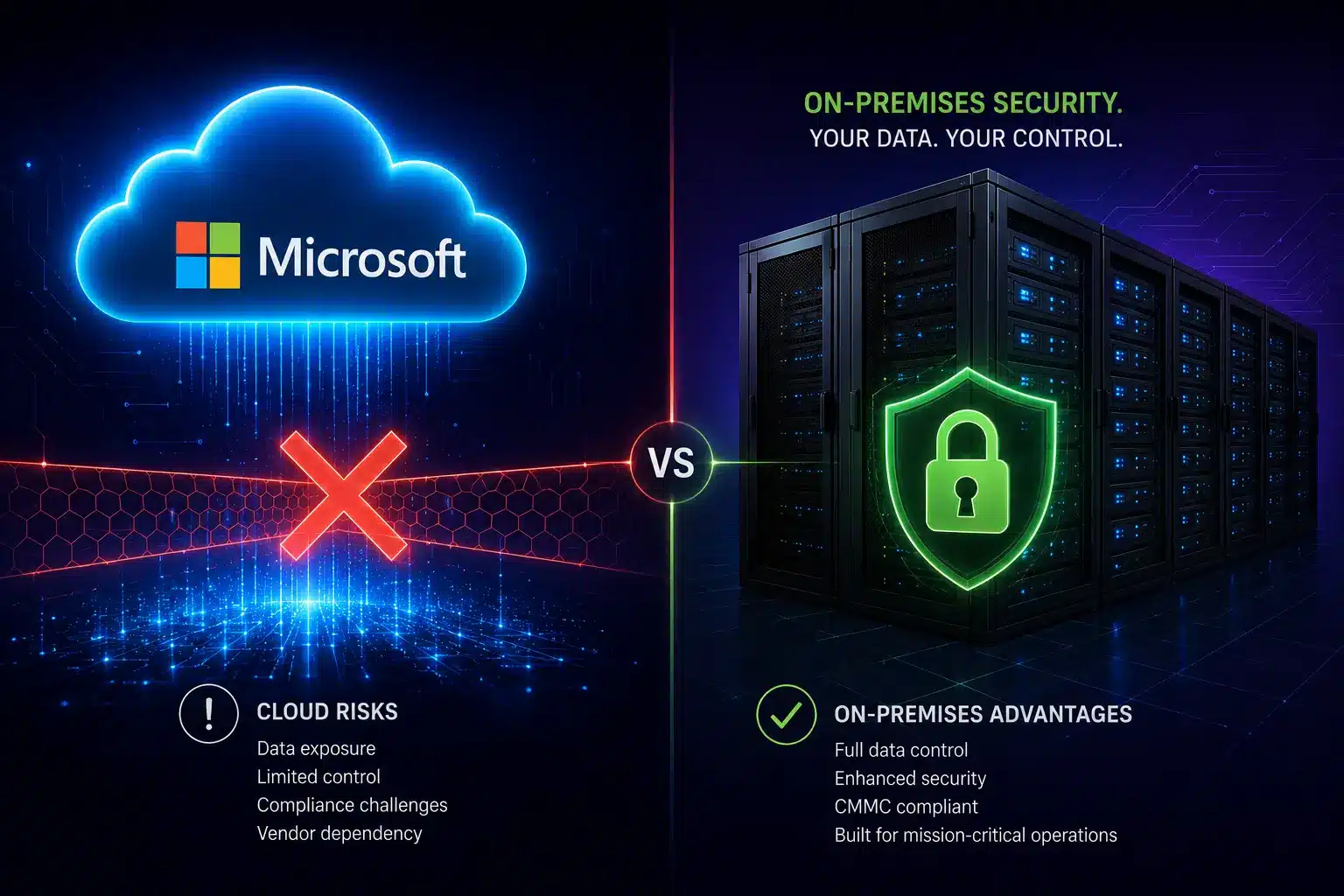
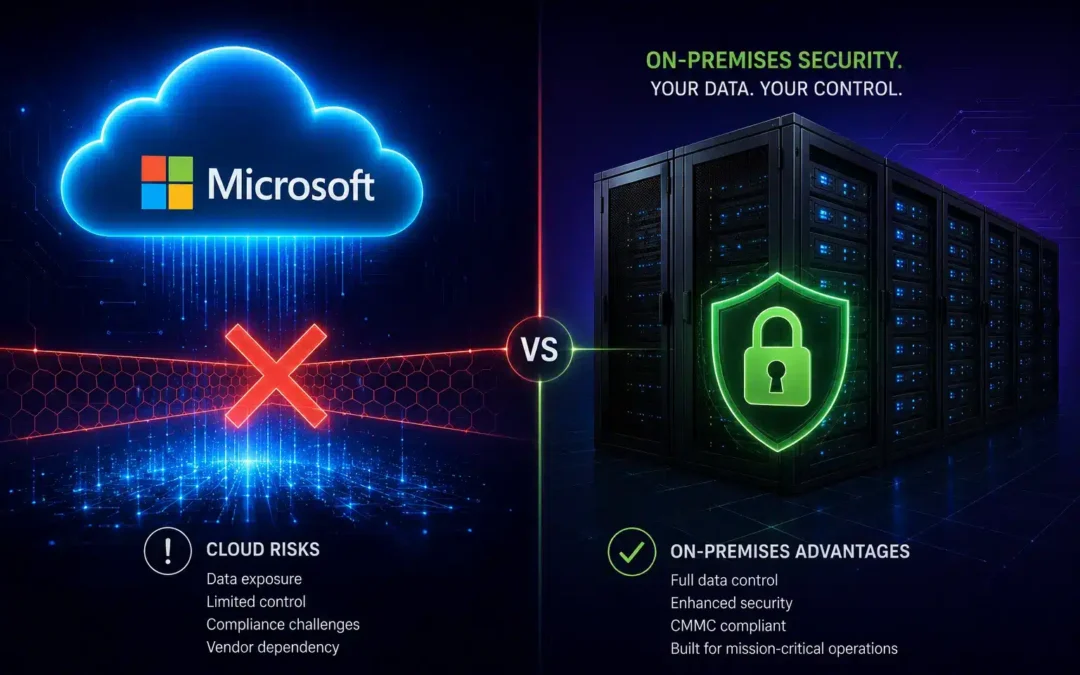
Diagram showing Microsoft Copilot's cloud-only access compared to local on-premises server infrastructure for businesses
Here’s the short version of this article: Microsoft Copilot is a solid AI tool — if every single piece of your business lives inside Microsoft’s Azure cloud. But most businesses aren’t there yet. If you run local servers, use third-party cloud platforms, store data outside of Azure, or deal with sensitive customer information, Copilot has some serious blind spots you need to know about. This post breaks down five of the biggest ones: the Azure-or-nothing data problem, the PII exposure risk hiding inside your permission settings, the fact that Copilot can’t search the web the way other AI tools can, the gap between what “agentic AI” means in the brochure versus real life, and the rate-limit issues that have been frustrating paying customers in 2026. Read on — and then decide if Copilot is actually the right fit for your setup.

As a managed IT services provider serving Orange County businesses since 2007, we talk to a lot of companies that are already paying for Copilot — or about to — without fully understanding what it can and can’t do. That’s what this is for.

MICROSOFT CLOUD (Azure) Copilot AI Cloud-only engine M365 Data Azure-hosted only CANNOT ACCESS: Local servers | Non-Azure cloud | On-prem databases AWS / Google Cloud | Legacy systems | Local file shares CONNECTIVITY BARRIER YOUR ACTUAL INFRASTRUCTURE Local Servers Files, ERP, CRM, DB Other Clouds AWS / GCP / Private YOUR BUSINESS DATA LIVES HERE: PII | PHI | Financial records | Customer data Proprietary IP | Compliance-regulated content

If Your Data Isn’t in Azure, Copilot Simply Can’t See It

Let’s start with the big one. Copilot lives entirely inside Microsoft’s Azure cloud. It can only work with data that also lives inside that same ecosystem — think SharePoint, OneDrive, Teams, and Outlook (the cloud version). That’s it. That’s the whole menu.

So what happens if your business runs a local file server? Copilot can’t touch it. Got a QuickBooks database sitting on a machine in your back office? Invisible to Copilot. Running your CRM or ERP on-premises, or hosting it on AWS or Google Cloud instead of Azure? Same story — completely off-limits. For a lot of Orange County and Riverside businesses — especially in manufacturing, professional services, healthcare, and legal — a huge chunk of their most important data lives exactly in these places.

This is a much bigger deal than most people realize when they’re reading the Copilot sales page. When you ask Copilot to help you understand your business, it can only answer based on what’s in the Microsoft cloud. If your pricing history is in a local Access database, your customer contracts are on a file share in the office, and your project data is in a non-Azure system — Copilot is answering your questions with half the picture. At best, that leads to incomplete outputs. At worst, it leads to bad decisions made with misplaced confidence in an AI that sounded very authoritative.

What About Copilot Connectors?

Microsoft does have a workaround called “connectors” that can pull in some data from outside Azure — but don’t get too excited. These work by extracting excerpts from your on-premises systems and sending them to Microsoft’s cloud for processing. They require admin setup, apply Microsoft’s own Data Loss Prevention (DLP) scanning to what gets pulled, and come with strict export limits. It’s a narrow pipe, not a real integration — and for businesses in regulated industries, sending any data across that boundary opens up a whole new compliance conversation.

16%

of enterprise business-critical files are
overshared — and Copilot inherits
every one of those permissions

48%

of cybersecurity professionals rank
agentic AI as the #1 attack
vector in 2026

29%

of organizations feel actually
prepared to secure agentic
AI deployments

PII Protection: Copilot Makes Your Permission Problems Worses

Here’s something Microsoft is very upfront about that most buyers gloss over: Copilot doesn’t create new access permissions — it inherits whatever permissions the logged-in user already has. That sounds reasonable until you think about what that actually means in the real world.

A 2025 enterprise security study found that 16% of business-critical files across organizations were overshared — accessible to far more people than they should be, the result of years of “just give everyone access” shortcuts and permissions that never got cleaned up. When a human employee stumbles into a file they shouldn’t have access to, it’s usually a one-off incident. When Copilot runs with those same over-broad permissions, it can vacuum up HR reviews, salary data, confidential client documents, and sensitive financial records — and quietly weave that information into AI-generated emails, summaries, and slide decks without a single warning.

Security researchers have documented real cases of this: Copilot pulling personal employee performance reviews into manager-facing summaries, and customer files containing PII — stored on SharePoint drives that were technically “public” inside the org — being summarized and redistributed with no data classification flag. Nobody did anything wrong. Copilot just did exactly what it was designed to do. That’s the problem.

Critical Risk: Prompt Injection Attacks via Copilot

Because Copilot reads your emails, documents, and Teams chats to do its job, bad actors have figured out they can hide malicious instructions inside those files — instructions that tell Copilot to quietly leak sensitive data. This is called a prompt injection attack, and Microsoft has acknowledged the vulnerability. If your org handles regulated data under HIPAA, PCI DSS, or CMMC, this is a risk that needs to be evaluated with your managed cybersecurity services partner before you go live with Copilot — not after.

For businesses in healthcare, financial services, or defense contracting, this isn’t a theoretical risk — it’s a compliance audit finding waiting to happen. Our compliance services team has seen companies roll out Copilot without first auditing their permission structure and end up with an AI that was surfacing data that would have failed their next review. The fix isn’t complex, but it has to happen before deployment, not after.

Web Search: Copilot Is Working With Yesterday’s News

One thing AI tools like Claude do really well is search the web in real time as part of getting things done. Ask Claude to research a competitor, check a new regulation, or look up the latest threat advisory, and it goes out and actually finds that information right now, then uses it to complete your task. That’s a genuinely useful capability — especially for cybersecurity and business intelligence work where things change fast.

Copilot, by contrast, is primarily grounded in your Microsoft 365 data and what it already knows from training. It doesn’t autonomously go out and search the web as part of completing a task the way other agentic AI platforms do. That means when you ask it a question that depends on current information — what a threat actor is doing right now, what a new regulatory guidance says, what a competitor just announced — you’re getting an answer based on what was true at some point in the past, or you’re doing the research yourself and feeding it in manually.

For IT support teams in Orange County managing live cybersecurity environments, stale intelligence isn’t a minor inconvenience — it’s a gap attackers can walk right through. Threat intelligence has a shelf life measured in hours. An AI assistant that can’t keep up with that pace is only useful for a subset of the tasks you actually need it for.

Agentic AI: The Gap Between the Demo and Reality

You’ve probably heard the phrase “agentic AI” a lot lately. The idea is compelling: instead of you typing a prompt and getting a response, the AI takes a goal, figures out the steps to accomplish it, executes those steps autonomously, checks its own work, and delivers a finished result. No hand-holding required.

Quick Explainer: What Is Agentic AI?

Agentic AI works through a plan-execute-verify loop. Give it a goal, and it breaks that goal into steps — using external tools, searching for information, reading and writing files, running code — adapting as it goes. Gartner predicts 40% of enterprise apps will incorporate task-specific AI agents by the end of 2026. The catch: only 29% of organizations feel prepared to actually secure those deployments.

Copilot does have agent capabilities, and within the Microsoft 365 ecosystem on clearly defined, well-scoped tasks, it does that reasonably well. But the moment a task requires stepping outside of Azure — accessing a local server, pulling from a non-Microsoft system, retrieving live information from the web — Copilot’s agents hit a wall. Those tasks still require a human to fill in the gaps, which is exactly the opposite of what you’re paying for agentic AI to do.

Other platforms like Claude are built agent-first, designed to autonomously operate across a much wider range of environments and data sources. On the SWE-bench Verified benchmark — the standard test for real-world AI autonomy — Claude Opus 4.7 scores 87.6%. Copilot doesn’t publish a unified score because performance varies wildly depending on which model is selected under the hood. For businesses evaluating AI to automate IT operations, security workflows, or multi-step business processes, that architectural difference is the ballgame: an agent that can only act inside your Microsoft cloud is a fundamentally limited agent.

What to Ask Before Choosing an MSP

Beyond our benchmark criteria, here are the practical questions that separate strong MSPs from those that will waste your time and budget. The best managed IT services provider in Orange County for your business depends on your industry, compliance obligations, growth plans, and tolerance for risk.

The Five Drawbacks at a Glance

1. Azure-Only Data Access

If your data isn’t hosted in Microsoft’s Azure cloud, Copilot cannot see it, use it, or act on it. Local servers, non-Azure cloud platforms (AWS, Google Cloud), legacy databases, and on-premises file shares are completely off-limits — no matter how important that data is to your actual business operations.

2. PII Exposure Through Inherited Permissions

Copilot inherits the access permissions of whoever is logged in. In most organizations, those permissions are messier than anyone wants to admit — and that means Copilot can expose sensitive PII, HR data, and confidential records through AI-generated outputs that look totally normal on the surface.

3. Prompt Injection Vulnerability

Because Copilot ingests emails, documents, and Teams messages, attackers can hide malicious instructions inside those files to manipulate what Copilot does — including leaking sensitive data. This has been confirmed by independent security researchers and requires specific mitigation before deployment in regulated environments.

4. No Real-Time Web Intelligence

Copilot can’t autonomously search the web as part of completing a task. For cybersecurity work, competitive research, or anything that depends on current information, you’re either working with stale data or doing the research yourself before handing it off to the AI — defeating much of the productivity benefit.

5. Rate Limits That Can Stop You Cold

In March 2026, GitHub discovered it had been miscounting tokens from newer AI models — meaning usage was far higher than accounted for. The fix resulted in aggressive rate limits that left paying customers locked out for days. As agentic workloads consume dramatically more compute than basic chat, this kind of disruption during a critical workflow is a real operational risk — one that almost never comes up in the sales conversation.

What to Check Before You Commit to Any AI Tool

The right AI for your business is the one that actually works with your infrastructure — not the one with the biggest vendor relationship or the most familiar brand. Whether you’re evaluating Copilot, Claude, or something else entirely, here’s what your IT support team in Riverside or Orange County should be asking before anything gets deployed.
  • Audit your permissions before anything else. If your files are overshared, you’re not ready for AI — you’re ready for a permissions cleanup. Your managed cybersecurity services partner can run that assessment and tell you exactly where you stand.
  • Map where your data actually lives. Cloud, on-premises, or a mix? Get an honest inventory. If critical business data lives outside Azure, Copilot will have a blind spot over some of your most important information.
  • Test web search with a real use case. Don’t accept a demo. Ask the vendor to show the AI retrieving live external information — a recent regulation, a new CVE, a competitor announcement — as part of completing an actual task you care about.
  • Push the agentic claims with a real workflow. Give the AI an actual multi-step task from your business and watch what happens. Vendor demos are optimized for the best-case scenario. Edge cases are where the gaps show up.
  • Ask specifically about prompt injection defenses. “Enterprise-grade security” is not an answer. Ask what the specific technical control is for preventing malicious instructions embedded in ingested documents from manipulating the AI.
  • Get rate limit policies in writing. If you plan to use AI in any workflow-critical capacity, you need to know the usage limits, how they’re enforced, and what your SLA is if you hit them mid-task.
  • Loop in compliance before you go live. If your business operates under HIPAA, CMMC, PCI DSS, or any other framework, involve your compliance services team before deployment. Fixing a compliance gap after a deployment is always more expensive than catching it before.

FAQ

Q: Can Microsoft Copilot access local servers?

Ans: No. Copilot primarily works within Microsoft Azure and Microsoft 365 environments.

Q: Is Microsoft Copilot safe for regulated industries?

Ans: It depends on permissions, compliance requirements, and security configuration.

Q: What are the biggest Copilot security risks?

Ans: Overshared permissions, prompt injection attacks, and limited visibility into non-Azure systems.

Q: Is Copilot better than Claude for hybrid environments?

Ans: Claude and other AI platforms may provide broader web access and cross-platform flexibility.

The Bottom Line

Copilot is a good tool for businesses that are all-in on Azure — fully cloud-native, well-governed permissions, and primarily using Microsoft 365 for their day-to-day work. That’s a real use case and it’s genuinely useful there. But that description doesn’t fit most of the businesses we work with across Orange County and the Inland Empire, and it probably doesn’t fit yours either if you landed on this article.

If you have local servers, data outside of Azure, employees handling regulated information, or workflows that need an AI to actually go find things on the internet — Copilot’s limitations are going to show up fast. The good news is that this is a solvable problem. There are AI tools that are built for hybrid and multi-environment setups, and there are ways to evaluate them without just taking a vendor’s word for it.

That’s exactly what the managed IT services team at TechHeights does for clients across Southern California — cut through the noise and help you make the right call for your actual environment, not a hypothetical one. Cybersecurity and AI strategy for businesses in Orange County and Riverside requires a partner who understands both the technology and what’s at stake when it doesn’t work the way it was supposed to.

Not Sure If Copilot Is Right for Your Setup?

TechHeights has been helping businesses across Orange County and Riverside make smart IT decisions since 2007 — including cutting through AI vendor hype to find what actually fits your infrastructure. Let’s take a look at your environment and give you a straight answer.
The Biggest Cybersecurity Threats for Businesses in 2026 — and How to Fight Back

The Biggest Cybersecurity Threats for Businesses in 2026 — and How to Fight Back

Cybersecurity Alert

The Biggest Cybersecurity Threats for Businesses in 2026 — and How to Fight Back

From AI-powered phishing to ransomware that destroys data, the cybersecurity threats for businesses have never been more dangerous. Here’s what your organization needs to know right now.
May 1, 2026           12 min read
Business cybersecurity threats in 2026 — shield protecting a corporate network from AI phishing, ransomware, and supply chain attacks
🛡 YOUR BUSINESS 🤖 AI Phishing 4x higher click rates 🔒 Ransomware 88% target SMBs 🔗 Supply Chain 30% of all breaches ⚠ Human Error Majority of incidents 🎭 Deepfake Fraud

The cybersecurity landscape in 2026 is the most hostile it has ever been. According to Verizon’s latest Data Breach Investigations Report, confirmed data breaches have surged past 12,000 incidents — the largest dataset in the report’s 19-year history. And while massive corporations dominate the headlines, the reality is far more uncomfortable for the rest of us: small and mid-sized businesses account for over 70% of all data breaches, and attackers are using artificial intelligence to target them at unprecedented scale.

If you run a business in Orange County, Riverside, or anywhere in Southern California, these aren’t abstract threats. They’re landing in your employees’ inboxes, exploiting the software you rely on, and costing companies like yours an average of $1.53 million per incident. This article breaks down the five biggest cybersecurity threats for businesses in 2026 and gives you a concrete action plan to defend against each one.

12,195

Confirmed data Breaches
in the 2026 Verizon DBIR

$16.6B

Total U.S. cybercrime
losses reported by FBI IC3

1 in 5

SMBs that went bankrupt
after a cyberattack

1. AI-Powered Phishing: The End of “Just Don’t Click It”

For years, the standard cybersecurity advice was simple: train your employees not to click suspicious links. That advice is now dangerously outdated. In 2026, cybercriminals are using generative AI to craft phishing emails that are virtually indistinguishable from legitimate business communications. These AI-generated messages reference real transactions, mimic your vendors’ writing styles, and even simulate internal workflows your team uses every day.

The numbers are staggering. AI-generated phishing emails now achieve click-through rates more than four times higher than their human-crafted counterparts, according to research from Huntress. And the FBI’s Internet Crime Complaint Center (IC3) recorded $16.6 billion in cybercrime losses last year alone — a 33% year-over-year increase — with AI-enhanced social engineering driving a growing share of those incidents.

Business Email Compromise (BEC), a particularly devastating form of phishing where attackers impersonate executives or vendors to redirect payments, hit $6.3 billion in losses according to the Verizon DBIR, with a median loss of $50,000 per incident. For a small business, that’s not a bad quarter — that’s potentially fatal.

Critical Takeaway

Traditional security awareness training alone is no longer sufficient. Your organization needs AI-powered email filtering that can detect the same generative patterns attackers are using. A managed cybersecurity services provider can deploy and monitor these tools 24/7 so your team doesn’t have to.

2. Ransomware Has Evolved — and It’s Targeting You

Ransomware isn’t new, but its playbook has fundamentally changed. In 2026, ransomware appeared in 44% of all confirmed breaches — up from 32% the prior year. For small and mid-sized businesses, the picture is even more alarming: 88% of breaches involving SMBs contained a ransomware component.

What’s different now is the business model behind these attacks. Ransomware operators have realized that encrypting files is just one revenue stream. Today’s attacks involve double and triple extortion: attackers steal your data before encrypting it, then threaten to leak it publicly, auction it to competitors, or destroy it entirely if you don’t pay. The median ransom payment sits at $115,000, but the total cost of recovery — including downtime, forensic investigation, legal fees, and reputation damage — averages $1.53 million.

Over two-thirds of ransomware attacks between 2024 and 2025 targeted businesses with fewer than 500 employees. Attackers view SMBs as low-hanging fruit: weaker defenses, outdated systems, and inconsistent patching make them easy targets for Ransomware-as-a-Service (RaaS) operators looking for fast payouts.

Why Backups Alone Won’t Save You

Many businesses assume that regular backups are their ransomware insurance policy. But with double extortion, attackers don’t just lock your files — they threaten to publish your client data, employee records, and trade secrets. You need endpoint detection and response (EDR), network segmentation, and a tested incident response plan. Managed IT services in Orange County can help you build these defenses before an incident forces your hand.

3. Supply Chain Attacks: Your Vendors Are Your Weakest Link

Your business might run a tight security operation. But what about the software vendors, cloud platforms, and managed service providers you depend on? According to the 2026 Verizon DBIR, third-party involvement was a factor in 30% of all breaches this year — double the rate from the previous year. Over the past five years, major supply chain breaches have quadrupled.

The attack pattern is insidious. Criminals compromise a trusted vendor — a CRM platform, a payroll provider, an HR tool — and then use that trusted access to reach their real targets: the vendor’s customers. Recent incidents involving platforms like Salesloft and Drift demonstrated how attackers leveraged compromised OAuth tokens to access Salesforce environments across dozens of downstream businesses.

For businesses in regulated industries like healthcare or financial services, a vendor breach isn’t just an operational problem — it’s a compliance crisis. If your patient data or financial records are exposed through a third party, you’re still on the hook for notification, remediation, and potential regulatory penalties.

How a Supply Chain Attack Unfolds

Step 1: Vendor Compromise

Attackers breach a software vendor or managed service provider through a vulnerability, stolen credentials, or social engineering. The victim company has no visibility into this stage.

Step 2: Trusted Access Exploited

Using the vendor’s legitimate access (API keys, OAuth tokens, VPN credentials), attackers pivot into customer environments. Security tools see this as normal vendor activity.

Step 3: Data Exfiltration

Attackers quietly extract sensitive data — customer records, financial data, intellectual property — often over weeks before detection. The median dwell time remains alarmingly long.

Step 4: Impact & Discovery

The breach is discovered, often by a third party or law enforcement. Your business faces notification requirements, legal exposure, and customer trust erosion — for an attack that never touched your own systems directly.

4. Deepfake Fraud: When You Can’t Trust Your Own Eyes

One of the most unsettling developments in 2026 is the weaponization of deepfake technology for corporate fraud. Criminals now generate real-time video and audio that perfectly impersonate executives, government officials, and business partners. The FBI’s IC3 has flagged deepfake-assisted fraud as the fastest-growing category of AI cybersecurity threats in the United States.

The most infamous example: a finance worker at a multinational corporation was tricked into authorizing a $25.6 million payment after a video conference call with what appeared to be the company’s CFO and several colleagues — all of whom were deepfake-generated replicas. AI-enabled fraud surged 1,210% in 2025, and projected losses are expected to reach $40 billion by 2027.

For small businesses, the implications are just as severe even at smaller dollar amounts. An accounts payable clerk who receives a voice call from someone who sounds exactly like the CEO, urgently requesting a wire transfer, has no reliable way to verify authenticity without pre-established verification protocols.

Action Required

Implement dual-approval financial controls for any transaction above a set threshold. Establish out-of-band verification — if you get a request by email or video call, confirm it through a separate channel (phone call to a known number, in-person). Consider pre-shared code phrases for high-value authorizations. These are low-cost, high-impact defenses.

5. The Human Factor: Still Your Biggest Cybersecurity Threat for Businesses

Despite billions spent on security technology, human behavior remains the root cause of the vast majority of breaches. Verizon’s data shows that the human element is involved in over 60% of all breaches, whether through social engineering, credential reuse, misconfiguration, or simple mistakes. Nearly 39% of cybersecurity incidents were directly linked to human error.

The problem isn’t that employees are careless — it’s that they’re overwhelmed. The average business worker manages dozens of accounts, receives hundreds of emails daily, and is asked to make security decisions without adequate training or tools. Password sharing via email and messaging platforms remains endemic, and more than one in five workers admit their credentials are written down offline.

The vulnerability exploitation trend compounds this: CISA added dozens of new entries to its Known Exploited Vulnerabilities catalog in 2026 alone, and the median time between a vulnerability’s public disclosure and mass exploitation was zero days for internet-facing devices like VPNs and firewalls. Your IT team — or your managed IT support provider in Riverside — needs to be patching these within hours, not weeks.

Your 2026 Cybersecurity Action Plan

The threats are real, but they’re not unbeatable. Here’s a practical checklist that any business — regardless of size or budget — can start implementing today. If you need help prioritizing or executing these steps, a managed cybersecurity partner can accelerate the process significantly.
  • Deploy AI-powered email security that detects generative phishing patterns, not just known malicious signatures. Legacy spam filters are no longer sufficient against AI-crafted attacks.
  • Implement phishing-resistant MFA everywhere — not just SMS codes, but hardware keys or authenticator apps. Prioritize email, financial systems, and remote access tools.
  • Maintain offline, tested backups with a documented recovery process. Test your restore at least quarterly. If your backup has never been tested, assume it doesn’t work.
  • Vet your vendors’ security practices before signing contracts. Ask for SOC 2 reports, review their incident response history, and limit the access third-party tools have to your environment.
  • Establish financial verification protocols with dual approvals and out-of-band confirmation for any payment over your chosen threshold. No exceptions for “urgent” requests.
  • Patch internet-facing systems within 48 hours of critical vulnerability disclosures. Subscribe to CISA’s Known Exploited Vulnerabilities alerts and treat them as urgent.
  • Run monthly security awareness training — brief, scenario-based sessions that reflect the AI-powered attacks your employees actually face today.
  • Create a one-page incident response plan so every employee knows who to call, what to disconnect, and what not to do in the first 30 minutes of a suspected breach.
THE FOUR LAYERS OF DEFENSE 📚 People Security training Phishing simulations Password hygiene 🛡 Technology EDR & AI email filters MFA everywhere Network segmentation 🔑 Process Incident response plan Vendor assessments Patch management 🤝 Partners Managed IT services 24/7 SOC monitoring Compliance support

The Bottom Line: Cybersecurity Is a Business Decision, Not Just an IT Problem

The cybersecurity threats for businesses in 2026 aren’t just more numerous — they’re fundamentally different from what we faced even two years ago. AI has supercharged both attackers and defenders, but criminals are adopting these tools faster than most businesses can respond. Supply chains have become attack highways. Ransomware has evolved from a nuisance into an existential threat for small businesses.

But the data also reveals something hopeful: the businesses that invest in layered defenses, employee training, and expert managed cybersecurity services are dramatically less likely to suffer catastrophic breaches. You don’t need a Fortune 500 security budget. You need the right partner, the right processes, and the discipline to treat cybersecurity as an ongoing business function — not a one-time project.

The companies that recognize this today will be the ones still serving their customers tomorrow. The ones that don’t may join the one in five SMBs that didn’t survive their first major cyber incident.

Don’t Wait for a Breach to Take Action

TechHeights delivers managed IT services, cybersecurity, and compliance solutions trusted by 250+ businesses across Orange County and Riverside since 2007. Let us assess your exposure to the threats outlined above and build a defense plan tailored to your business.

Mythos and the New Wave of AI: Why SMB Cybersecurity Will Never Be the Same

Mythos and the New Wave of AI: Why SMB Cybersecurity Will Never Be the Same

Cybersecurity Alert

Mythos and the New Wave of AI: Why SMB Cybersecurity Will Never Be the Same

Frontier AI models can now autonomously hack networks. Here’s what managed IT services and cybersecurity experts say SMBs must do right now to stay protected.

April 15, 2026           8 min read
AI cybersecurity threats targeting small and mid-sized businesses
AI THREAT YOUR BUSINESS SMB NETWORK DEFENSE
The cybersecurity landscape shifted dramatically in April 2026 when Anthropic unveiled its frontier AI model, Claude Mythos Preview, as part of a new security initiative called Project Glasswing. What security researchers discovered has sent shockwaves through the industry: an AI system capable of autonomously executing multi-stage cyberattacks, discovering thousands of zero-day vulnerabilities, and completing full network takeovers in a fraction of the time it would take a human expert.

For small and mid-sized businesses (SMBs), this represents an inflection point. The barrier to launching sophisticated cyberattacks has effectively collapsed, and SMBs — often operating with limited security resources — now sit squarely in the crosshairs. If your business operates in Southern California, working with experienced cybersecurity companies in OC and Riverside has never been more critical.

The Mythos Wake-Up Call

The UK’s AI Safety Institute (AISI) conducted independent evaluations of Mythos Preview and the results are staggering. AISI built a 32-step corporate network attack simulation called “The Last Ones” (TLO), spanning everything from initial reconnaissance to full network takeover — a scenario estimated to take human experts roughly 20 hours to complete. Mythos Preview became the first AI model to solve TLO end-to-end, succeeding in 3 out of 10 attempts and averaging 22 of 32 steps across all tries.

Even more concerning: Mythos identified thousands of previously unknown zero-day vulnerabilities across every major operating system and browser. Among the most striking discoveries were a 17-year-old remote code execution flaw in FreeBSD (triaged as CVE-2026-4747) that could give attackers full control of a server, and a 27-year-old denial-of-service vulnerability in OpenBSD’s TCP SACK implementation — remarkable given that OpenBSD is widely regarded as one of the most security-hardened operating systems in existence. For cybersecurity companies in OC and Riverside, these findings underscore just how many hidden vulnerabilities lurk in systems businesses depend on every day.

Critical Takeaway

On expert-level capture-the-flag cybersecurity challenges — tasks no AI model could complete before April 2025 — Mythos Preview now succeeds 73% of the time. It’s worth noting that AISI’s TLO simulation had no active defenders or defensive tooling, meaning real-world networks with proper managed IT services would be harder to breach. Still, the gap between attack and defense is narrowing fast.

Why SMBs Are the Primary Target

If you run a small or mid-sized business, you might assume that cybercriminals are focused on larger enterprises. The data tells a very different story. According to industry research from Verizon’s DBIR and Accenture, SMBs have officially surpassed large enterprises as the primary targets for organized cybercriminal groups, and AI tools are the reason the economics have shifted. It’s a key reason why managed IT services have become essential rather than optional for growing businesses.

43%

of all cyberattacks
now target SMBs

83%

of SMBs are not financially
prepared to recover

60%

of attacked SMBs close
within 6 months

With generative AI, criminal syndicates can now target hundreds of SMBs simultaneously with highly personalized attacks. A single phishing email crafted by AI is grammatically flawless, contextually aware, and nearly indistinguishable from legitimate communication. Phishing remains the primary intrusion vector, accounting for roughly 60% of incidents — and AI has made it exponentially more dangerous.

The Five AI-Powered Threats Keeping CISOs Up at Night

  • 1. Autonomous Attack Agents AI-driven systems that can autonomously chain exploits, move laterally through networks, and escalate privileges — all without a human operator. Mythos demonstrated this is no longer theoretical.
  • 2. Hyper-Personalized Phishing at Scale AI generates contextually rich, grammatically perfect phishing emails that reference real projects, colleagues, and company events. Traditional spam filters can’t catch them.
  • 3. Deepfake Executive Impersonation The “CEO doppelgänger” — a perfect AI-generated replica of a business leader capable of issuing convincing voice or video directives to finance, HR, and IT teams in real time.
  • 4. Data Poisoning and Model Manipulation Attackers invisibly corrupt the training data of AI models your business relies on, leading to subtly wrong decisions across operations — from financial forecasting to customer recommendations.
  • 5. Rogue AI Agents and Shadow AI Insider threats now include AI agents capable of goal hijacking, tool misuse, and privilege escalation at machine speed. With 83% of organizations deploying agentic AI but only 29% operating those systems securely, the attack surface is enormous.
YOUR DEFENSE LAYERS 🔑 IDENTITY MFA & Zero Trust 🛡 DETECTION AI-Powered EDR 📚 TRAINING Continuous Education 💾 RECOVERY Backup & Response Defense-in-depth: No single layer is sufficient in the age of AI-powered attacks

What Your Business Must Do Now: A Post-Mythos Action Plan

The good news: you don’t need a Fortune 500 security budget to defend against AI-powered threats. But you do need to act deliberately, prioritize the right controls, and build security into your operations rather than bolting it on as an afterthought. Partnering with a trusted managed IT services provider can help you implement these controls efficiently, even with a lean team. Here’s your action plan.

Lock Down Identity and Access

Identity has become the primary battleground in the AI economy. Move critical applications to FIDO2/WebAuthn or device-bound passkeys wherever possible. Enforce conditional access policies that evaluate user identity, device health, location, and risk signals in real time. At a minimum, enforce multi-factor authentication (MFA) across every account — no exceptions.

  • Implement MFA on all business accounts (email, cloud, financial tools)
  • Adopt passkeys or FIDO2 authentication for critical systems
  • Apply least-privilege access: employees only get permissions they need
  • Conduct quarterly access reviews to remove stale accounts

Deploy AI-Powered Detection and Response

If attackers are using AI, your defenses need AI too. Deploy endpoint detection and response (EDR) solutions with built-in machine learning capabilities that can spot unusual behavior in real time. AI-enhanced email filters are a quick win — most major cloud email providers now include them. Consider partnering with managed cybersecurity services providers if you lack in-house expertise for 24/7 monitoring — especially cybersecurity companies in OC and Riverside that understand the needs of local SMBs.
  • Deploy EDR solutions with AI/ML-powered threat detection
  • Enable AI-enhanced email filtering for phishing protection
  • Implement network monitoring for anomalous lateral movement
  • Evaluate managed security services for 24/7 coverage

Train Your People — Continuously

Annual cybersecurity training is no longer sufficient when threats change monthly. Your awareness program needs to be short, frequent, and relevant. Run phishing simulations that use AI-generated content. Train staff to verify executive requests through secondary channels — especially wire transfers or credential changes. Establish clear policies for AI tool usage within your organization.

    • Run monthly micro-training sessions (10–15 minutes each)
    • Conduct AI-powered phishing simulations quarterly
    • Create verification protocols for financial and access requests
    • Publish an AI acceptable-use policy for all employees

    Build Resilient Backups and an Incident Response Plan

    Assume a breach will happen. The question isn’t whether — it’s whether you can recover. Maintain encrypted, offline backups tested regularly for restoration. Document your incident response plan and make sure leadership understands recovery timelines. Create “kill switches” to halt rogue AI agents and maintain human-in-the-loop oversight for all critical automated processes.

      • Maintain 3-2-1 backups: 3 copies, 2 media types, 1 offsite/offline
      • Test backup restoration quarterly — untested backups are not backups
      • Document and rehearse your incident response plan
      • Implement kill switches for any AI or automated systems

      Govern Your AI Supply Chain

      If your business uses AI tools — and in 2026, nearly every business does — you need governance around them. Managed compliance services in Orange County can help you conduct vendor risk assessments to ensure third parties validate AI-generated code before deploying to production. Scan for hallucinated software packages in AI-generated code. Evaluate the security posture of any AI service your business depends on, and ensure you meet frameworks like CMMC, HIPAA, NIST, and ITAR as applicable.
      • Inventory all AI tools and services used across the organization
      • Require security assessments for AI vendors and integrations
      • Scan AI-generated code for vulnerabilities before deployment
      • Monitor for shadow AI usage by employees
      A Note on Proportional Response

      You don’t need to implement everything at once. Start with identity controls and backups — these two foundations stop the majority of attacks. Then layer on detection, training, and governance as resources allow. Consider partnering with a managed security provider to accelerate your maturity without hiring a full security team.

      The Bottom Line

      Mythos didn’t create the threat — it made the threat visible. The autonomous offensive capabilities demonstrated by frontier AI models are a preview of what every business will face as these technologies proliferate. The asymmetry between attack and defense has never been greater: attackers now have AI-powered tools that work at machine speed, while most SMBs are still operating with last decade’s playbook.

      The organizations that survive will be the ones that treat cybersecurity not as an IT expense, but as a core business function. Strong identity controls, AI-powered detection, continuous training, resilient backups, and disciplined AI governance aren’t optional upgrades — they’re the price of staying in business. For businesses across Orange County and Riverside, partnering with a proven managed IT services provider is one of the most effective steps you can take.

      The threat is real. The tools to defend yourself exist. The only question is whether you’ll act before the next AI-powered attack reaches your inbox.

      Don’t Wait for a Breach to Take Action

      TechHeights delivers managed IT services, cybersecurity, and compliance solutions trusted by 250+ businesses across Orange County and Riverside since 2007. Find out where your vulnerabilities are before attackers do.